This is a well-known tool designed to assist users in cleaning their hard drives of various forms of garbage that accumulates over months or years and interferes with the operating system’s proper functioning. This application lets you quickly and easily free up hard disk space. As always, you may download Wise Disk Cleaner from the full article.
The software will filter out garbage files and distinguish them from real ones. Its algorithms can handle a variety of formats that can be safely destroyed. You can include your own formats that you are certain you will not need. When you activate the software, it immediately starts scanning your operating system. When the findings are complete, you can review them to gather as much information as possible and remove any extraneous details. There is a custom mode that lets the app choose what to delete, but I would not rely on it alone.
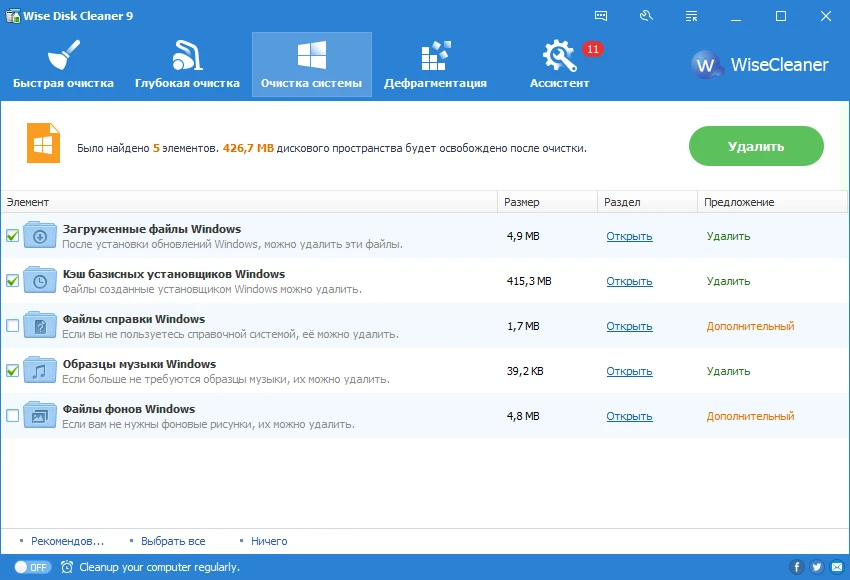
Of course, Wise Disk Cleaner’s user interface is superb. It’s really enjoyable and simple to use. It is also localized in Russian, allowing you to access all of the utility’s features easily. You have three cleaning options: general, advanced, and system. After selecting it, I quickly saw that my machine contained about 2 gigabytes of trash. Overall, Wise Disk Cleaner elicits only positive responses. It’s appealing appearance, tidy localization, no-registration requirement, and everything being extremely obvious. If you have any complaints about the program, know of any serious problems, or use it and wish to promote it, please leave a remark. Do not forget to do this. Have a lovely day!
Peculiarities:
- Interface in Russian.
- There is a Deep Cleaning mode that detects even the most stubborn debris.
- Defragmentation of hard disks with strong algorithms, resulting in slightly quicker system performance.
- There is a fast cleaning mode for daily use.
- You can regulate the PC power after the primary software operation is accomplished.
- A colorful UI walks you through the basic settings.
- Nice graphics.