Looking for a quick and easy solution to snap screenshots from Windows screens and full-screen games? HyperSnap is the solution! It can also capture text (TextSnap) in places where standard text copying is not possible.
HyperSnap combines the capabilities of a first-rate screen capture application with an advanced image editing utility – all in one user-friendly package! It’s ideal for creating images for help systems, online tutorials, manuals, training handouts, presentations, marketing materials, Web pages, emails, and more.
Want to share a picture-perfect reproduction of anything on your screen in a snap? Download HyperSnap now! Capture screens from full-screen games utilizing DirectX/Direct3D technology, and choose between a modern “ribbon” interface and conventional menus.
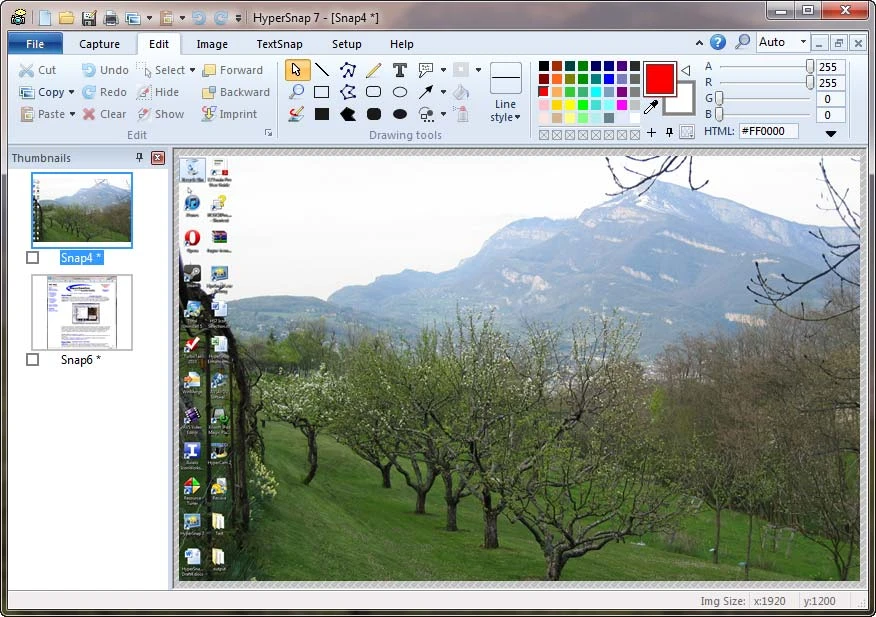
Features of HyperSnap 2026
- HyperSnap lets you capture screenshots from a variety of sources, including the entire desktop, individual windows, scrolling web pages, games, and more.
- Text Capture: HyperSnap lets you capture text from areas where regular text selection is not allowed, such as graphics, text within images, and more.
- Image Editing Tools: It offers a full range of editing tools to help you improve your screenshots. Crop, resize, annotate, add shapes, use filters, and much more.
- Scrolling Capture: This function lets you capture long web pages, documents, and other content that extends beyond the visible area of the screen.
- Auto-Capture and Timed Capture: It includes automatic capture features, such as timed and periodic grabs, which are handy for creating tutorials and monitoring screen activity.
- Built-in Image Viewer: You can quickly examine and browse collected screenshots with HyperSnap’s built-in image viewer, saving you time and effort.
- HyperSnap provides powerful clipboard functionality, making it easy to copy and paste screenshots into other applications.
- Image Format Support: The software supports a wide range of image formats, including JPEG, PNG, BMP, GIF, and TIFF, giving you more options for saving and sharing screenshots.
Benefits of HyperSnap:
HyperSnap has several advantages that make it a popular choice among users:
- Ease of Use: HyperSnap’s intuitive interface and user-friendly design make it simple for both new and experienced users to explore and use its capabilities effectively.
- Enhanced Productivity: HyperSnap saves time and effort by capturing and editing screenshots rapidly, allowing you to focus on your activities uninterrupted.
- Versatility: Whether you need to capture a specific window, an entire webpage, or a game screen, HyperSnap lets you capture screenshots from any source with ease.
- Advanced Editing Capabilities: The software’s powerful editing features let you add annotations, text, shapes, and filters to your screenshots, making them more informative and visually appealing.
- Sharing and Collaboration: With HyperSnap, you can effortlessly save and share your screenshots. You can email them, upload them to cloud storage, or share them on social media sites to promote seamless collaboration.
Portable HyperSnap
Portable HyperSnap lets you capture screens on the fly. Install on a USB key to keep settings consistent across machines and rapidly capture images for tutorials, presentations, and more, ensuring you’re always prepared to share what’s on your screen.