GiliSoft Any File Encryptor for Windows. Do you want to make your videos/audio/pictures inaccessible to anybody except those you allow? You don’t have to worry, because using Any Video Encryptor to password-protect videos is straightforward. Any Video Encryptor allows you to prevent the unlawful copying and dissemination of your media files. You can use this encryption tool to encrypt various types of video or audio files (e.g., WMV, AVI, ASF, MPG, RM, RMVB, MP4, FLV, and other formats) into GEM files that can only be played with a Playback Password. Users can only play the encrypted media files after obtaining the Playback Password you provide.
When a user attempts to play an encrypted file, a dialogue box appears requesting a Playback Password.
We also provide a command-line version for enterprise users to deploy or use for secondary development; please get in touch with us if you require this.
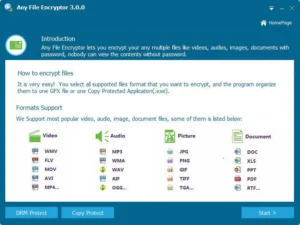
Features of GiliSoft Any File Encryptor:
Government-level Security
Any Video Encryptor encrypts content using the Advanced Encryption Standard (AES), one of the most widely used and secure encryption algorithms available today. It is the encryption used by the National Security Agency to secure materials classified as “top secret”.
Protect All Media Formats.
Any Video Encryptor can effortlessly encrypt almost any type of video, audio, or image file. Our free media encryption solution protects MP4, AVI, MKV, WMV, MTS, RMVB, MXF, VOB, FLV, MPEG, TS, MP3, AAC, AC3, OGG, WMA, JPG, BMP, and PNG files.
High-Speed Encryption
Time is the most valuable resource for many of us; who wants to waste it waiting? You can now encrypt your videos at original quality in seconds with the new SuperSpeed encryption. No video conversion or quality loss; videos in SuperSpeed mode are as fast as moving files between folders.
Package several documents quickly.
You can encrypt many files, of the same or different types, into a single package file with a single Playback. The program includes a built-in video and music player, as well as a viewer for your photographs and documents, so that you can maintain your privacy at all times.
GEM or EXE formats.
This application may export two encryption formats: GEM and EXE. A GEM file contains one or more video, audio, or image media files that can be played with the built-in free video player. You can send them a GEM file and instruct them to download Free Video Encryptor to watch. This tool generates EXE portable applications. There is no need to install the application on the other end to view the contents.
Prevent Duplication.
The application protects against data infringement, which can result in lost revenue and intellectual credit. Advanced copy protection technology prevents unauthorised access to your data—unbreakable protection for all of your media files, including videos, audios, photos, and documents.
Copy Protection
The program employs innovative data-leak protection technology that prevents the duplication of your vital files and copyrighted content to any USB drive or similar storage device without your permission.
Data Leak Prevention
It stops your data from being leaked to USB drives and other similar storage devices. The application encrypts your media files into executable files that will only execute on the drive you specify.