Looking for a robust tool that can handle a wide range of CAD and plot files? ViewCompanion Premium is the solution! PLT plot files, Adobe PDF, Autodesk DWF, Postscript, CGM, TIFF, CALS, and many other formats may all be easily viewed, printed, and converted. This software provides extensive support for PLT plotter files in HPGL, HPGL/2, HP-RTL, and Calcomp formats.
If you need to share drawings online, ViewCompanion Premium can convert them to popular formats such as Autodesk Drawing Web Format (DWF), Scalable Vector Graphics (SVG), and Adobe PDF. These formats are perfect for sharing drawings online. You can even combine many files in various formats into a single multipage PDF, DWF, or TIFF file.
Furthermore, ViewCompanion Premium allows you to split multipage PDF, DWF, or other files into single-page documents. PLT, PDF, CGM, and DWF files may all be converted to Autodesk DXF format for use with CAD applications such as Autodesk AutoCAD and MicroStation.
The software has batch converting and printing capabilities. It can be set to watch a user-specified folder and automatically report any files copied there. Download ViewCompanion Premium now to improve your CAD and plot file management!
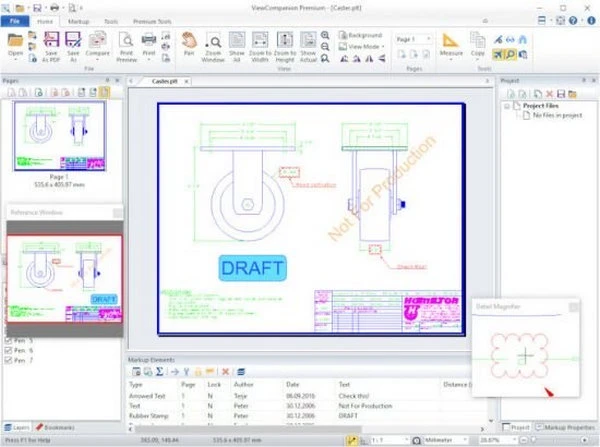
Features of ViewCompanion Premium:
- View, markup, convert, and print files of various formats.
- Convert to a variety of output formats; please see the full list below.
- Batch printing and conversion are included.
- Color, black-and-white, or grayscale printing and conversion.
- Scaled print or fit to paper.
- Poster mode allows you to print large-format drawings on several sheets. For example, you can print an A0 drawing at full size on multiple A4 pages.
- N-up printing is also known as printing multiple pages on a single sheet of paper.
- Hot folder printing. Monitor a folder and report all files copied into it.
- Include a footer and header with the date, scale, time, filename, or custom text in the printed file.
- You can annotate your files with text, symbols, stamps, barcodes, photos, measurements, and other information.
- Add annotations during printing and converting.
- Precision measurement with snap-to-draw geometry.
- Send the scanned file via email, either in PDF, JPEG, or its original format.
- Convert any PDF file to the PDF/A standard for archiving. Both batch and single files are supported.
- Compare two files and see the differences.
- Compare multipage PDF files page by page.
- Combine multiple PDF files into a single multipage PDF.
- Separate a multipage PDF file into individual files.
- Digitally sign PDF documents.
- Optimize PDF files.
- Split a multipage TIFF file into several files.
- Scan and generate a new file, or add a page to the current file.
- Use raster processing utilities such as deskew, cleaning, and others.
- Overlay up to ten files and print as a single drawing.
- Apply a text or image watermark to the printed file.
- The Pen table allows for complete customization of colors, styles, and widths.
- Copy a specified part or the entire drawing to the clipboard, then paste it into another application.
- Text search and extraction.
- Store frequently used files in projects.
- Shell Extension provides quick access to Explorer Window functionality and a full preview of the selected file.
- Extensive command-line options for conversion and printing.
- Delete pages from multipage files (such as TIFF and PDF).
- Use the PDF-to-CAD tool to convert PDF files to editable DXF, DWF, PLT, SVG, and CGM formats.
Portable ViewCompanion Premium.
Portable ViewCompanion Premium provides mobile access to your technical drawings. It can be loaded from a USB device and used to browse, print, and convert various CAD and plot files without installation, ensuring seamless file management from anywhere.