Is your processor underperforming? Bitsum created ParkControl Pro because essential parking settings are hidden in Windows but can significantly impact performance, especially during CPU-constrained bursts (the most common type).
ParkControl Pro provides direct control over your CPU core parking settings, allowing you to tune your system for maximum performance and responsiveness. Unleash your processor’s full capacity and enjoy smoother performance in games, applications, and daily tasks.
Take command of your CPU by downloading ParkControl Pro today and discovering hidden performance advantages for a quicker, more responsive system!
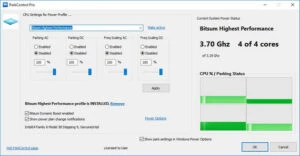
Features of ParkControl Pro Full
Core Parking
Most modern x86 CPUs and Windows versions offer Core Parking, a sleep state (C6). When CPU cores are idle, Core Parking dynamically disables them to preserve power. Disabled cores are re-enabled once CPU demand increases again. This method is similar to frequency scaling in that it aims to throttle the CPU when idle.
The issue is that Windows’ default power profiles are adjusted way too aggressively for core parking, particularly on workstations. Their goal was to save energy, even if it meant slightly worse performance. Many sophisticated factors determine whether a core should be parked, with Microsoft focusing heavily on power conservation.
Windows implements the main parking settings as power plan parameters (also known as power profiles). This means you can, for example, disable core parking for the High Performance power plan while keeping it enabled for other plans. And that is precisely what most customers want: to turn off parking exclusively for high-performance power plans.
Efficacy
Empirical research suggests that removing core parking can significantly improve system performance. Numerous factors influence the effectiveness of atem, including CPU type, application load, and user behaviour. We discovered that Windows is frequently overly aggressive in its core parking, resulting in excessive latency as cores are unparked to handle bursting loads (the most common type of CPU load).
In our tests, we discovered that eliminating core parking benefits AMD CPUs the most. This could be owing to the significant variation in how AMD processors distribute (hardware) computing resources amongst logical cores. Microsoft optimised for Intel HyperThreading, which has far weaker secondary cores. AMD’s auxiliary logical cores are almost entire CPUs.
YMMV, but if we hadn’t noticed genuine, significant performance improvements after deactivating core parking, we wouldn’t have created this application.
Safety
These adjustments are completely safe for any properly constructed PC. The only way they could cause a behaviour change is if the PC is overheating. In such a case, the faults would be observed regardless of the adjustments, simply by placing a persistent high demand on the CPU.
Portable ParkControl Pro
Optimise CPU core parking while running. The software can also be utilised via USB. Access and optimise CPU core parking on any compatible PC to keep your system’s performance at peak.