Still not enough programs to get films and music from different websites? Then there’s iDownerGo, which is a new app for me but, judging by the version, not that new. It’s ideal for this work, as it makes downloading media files in numerous formats simple.
According to the designers, its main feature is that it supports over a thousand websites, including YouTube and Vimeo. It also works with social media platforms such as Instagram and Facebook. If you’re really curious, there’s a list on the creator’s website.
When you launch the app, you’ll notice a straightforward UI that is easy to navigate, similar to other apps. Adding or pasting a video link is simple. The software monitors the buffer and retrieves links as needed.
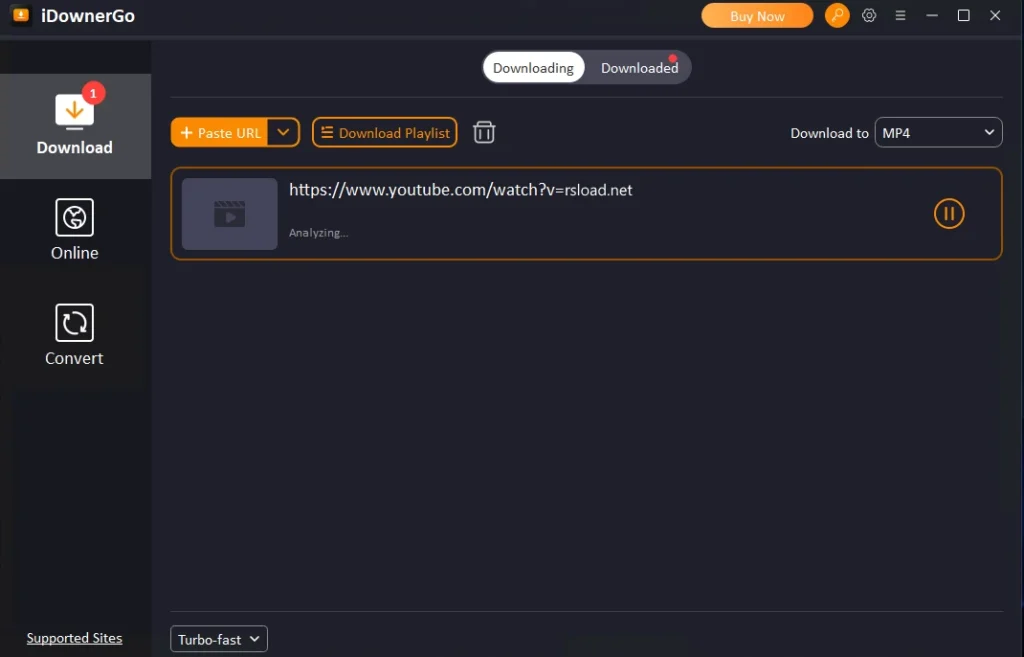
iDownerGo supports a variety of file types, including MP4 and AVI, as well as audio files such as MP3 and FLAC. There are predefined profiles for a variety of devices.
You can also set up automatic subtitle downloads. You can track the download progress online. After the process is complete, you can shut down your computer or switch to another mode—both are customizable.
Briefly:
- You can create your own download lists and password-protect them.
- Original quality is intact.
- A convenient built-in browser for monitoring
- There is a search string; it is convenient to search within the software.
- You can watch saved videos without an internet connection.
- Works on thousands of different websites.
- User-friendly interface
So, iDownerGo is more than just a download; it’s a full-featured multimedia solution ideal for folks who enjoy listening to music and collecting films.