BleachBit is a tool that cleans your computer of temporary files and garbage. Assume your drive is filled with browser cache, logs, backups, and accumulated trash. This software will help you free up space and speed up your system.
You can get BleachBit for free from us; it’s fully free and open source.
Features:
- The key distinction between this program and built-in Windows tools is that it dives deeper and detects garbage in locations where ordinary cleaning fails. It deletes temporary files and backups, such as VIM swap files, DS_Store data, Thumbs.db, and more. It can also wipe out recent document listings, search history, shellbags, and other files.
- In addition, Windows Defender has a cleaning function that removes copies, history, logs, quarantined items, and temporary files.
- The system cleaning software can clear the clipboard, delete memory files, and clear logs and the system cache. There is also an option to overwrite free disk space, rendering erased data unrecoverable.
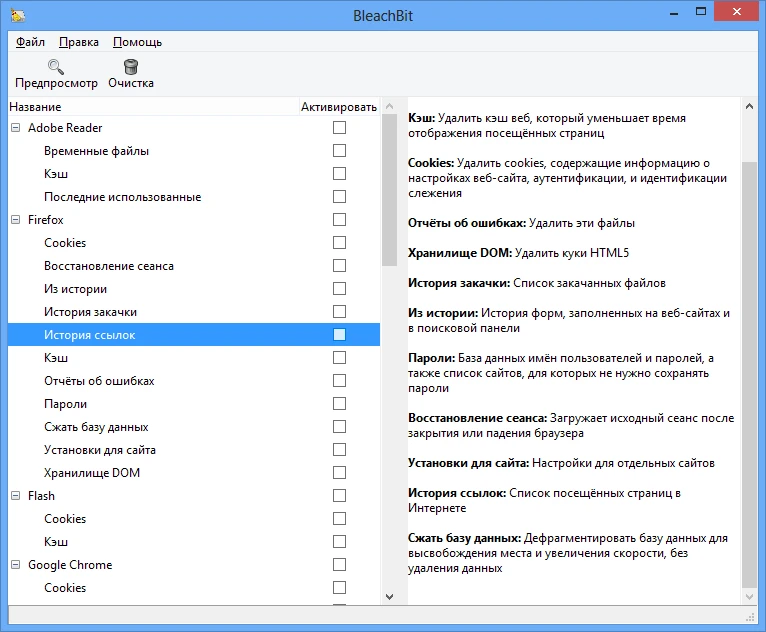
- It also cleans up browsers by removing cache and cookies, download and form history, logs, passwords, search engines, website preferences, and whole browser sessions.
There is a Preview button—click it to instantly see a list of all the files that will be removed, how much space will be freed, and to ensure nothing vital is affected. Then click Clean, and the application will wipe everything.
The interface is simple: check the boxes next to the items you wish to clean and begin the procedure.
It loads swiftly, even on older PCs. The operating system may run more quickly after cleaning, depending on how much garbage was present at the start.
Among similar apps, CCleaner is the most well-known cleaner; its functionality is similar, but the UI may be easier to understand for beginners. There is also Wise Disk Cleaner, which is a fantastic option; while it may run faster, BleachBit offers greater flexibility.