Slow, unreliable WiFi bothers everyone. Wireless difficulties should not be diagnosed based on assumptions. WiFi Explorer Pro is a professional WiFi scanner and analyzer for Windows, designed primarily for WLAN and IT professionals. It enables you to design, validate, and debug wireless networks with confidence. Clear, sharp visuals show signal strength, channel usage, interference, and network congestion at a glance. In-depth data lets you swiftly detect issues and manage your network for faster, more reliable WiFi. Whether you’re establishing a new network or troubleshooting an existing one, WiFi Explorer Pro provides the professional-grade information you need to complete the task correctly.
Features of WiFi Explorer Pro:
A powerful WiFi scanner
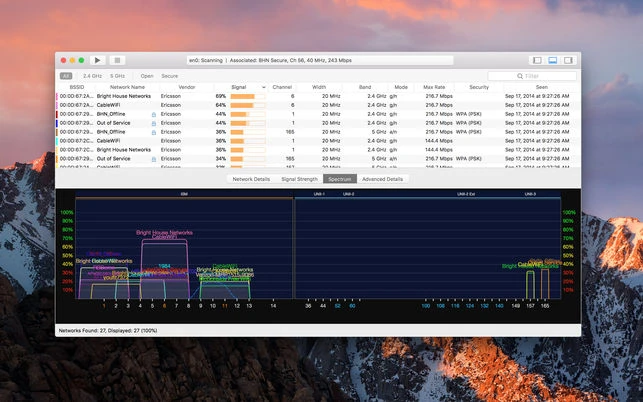
Traditional WiFi scanners provide only the required information about neighboring WiFi networks. WiFi Explorer Pro for Windows goes beyond, providing specialized tools to help you analyze and evaluate home, small-office, and enterprise WiFi networks.
Detailed analysis
WiFi Explorer Pro for Windows provides detailed information to help you examine, diagnose, and evaluate the capabilities and setup of wireless networks. Each field can be transformed into a column, allowing for easy network analysis, sorting, and filtering.
Lightweight and fast
We created WiFi Explorer Pro for Windows to be fast and tidy. WiFi Explorer Pro allows you to focus on relevant information as you explore the scan results and hide or show network information based on your needs, such as labels, device names, or notes.
Always up to date.
Whether you’re a tech enthusiast, a professional, or a casual user, WiFi Explorer Pro for Windows keeps you at the cutting edge of wireless innovation by supporting the latest WiFi standards, including WiFi 6, WiFi 6E, and WiFi 7.
Latest Standards Support
Discover and evaluate networks using the latest Wi-Fi standards.
Custom Columns
Create custom columns from over 850 available fields.
Custom Filters
Make custom filters for certain troubleshooting tasks.
Remote Scan Support.
Use a compatible remote sensor to scan for WiFi networks remotely.
Capture File Support.
Import captures files to visualize the networks they contain.
External Adapter Support
Scan for WiFi networks with external adapters.
System requirements
Requires Windows 10 or later. (32 and 64 bits)