Nuclear Coffee created VideoGet, a useful program for Windows users to download videos from over 900 websites, including major ones like YouTube, DailyMotion, and MetaCafe. It’s ideal for people who enjoy saving their favorite video snippets. Not only does it download FLV videos, but it also transforms them to popular formats such as AVI, MP4, and WMV for easier playback. You may also watch these films on your iPod, smartphone, or other portable device! VideoGet lets you adjust video and audio quality, frame rate, video size, and audio sampling rate. It’s a straightforward and user-friendly method for watching videos offline. Don’t delay—download VideoGet from the developer’s website today!
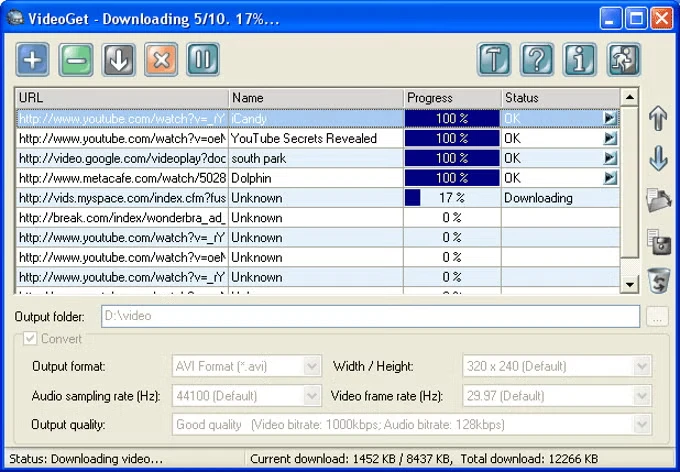
Features of VideoGet
- Downloads videos from YouTube and over 900 other video websites.
- Converts videos to several video formats (*.AVI, *.MPG, *.WMV, *.FLV, *.MP4, *.3GP, *.RM, *.MOV, *.MP3, *.WAV).
- Video can be converted to any portable video device, including the iPhone, iPod Video, iPod Nano, iPod Touch, PSP, Zune, iRiver Clix, and AppleTV.
- One-click-download-convert. Plugins for the Internet Explorer and Firefox browsers
- The script auto-updater keeps you always up to date with the latest version.
- Simultaneous download is supported. To speed up downloads, VideoGet lets you download up to 20 videos simultaneously.
- The “Download while converting” option will immediately begin downloading the next video while the previous one is being converted.
- Simultaneous file conversion lets you convert up to 10 videos at once.
- The new “YouTube in HQ” feature lets you save high-quality YouTube videos.
- Automatically remove downloaded files from the list. When you close VideoGet, it will immediately erase all downloaded files from the list.
- MMS streaming media protocol is supported.
- Download operates using the WinInet API, which Internet Explorer uses, allowing rapid download of Flash movies.
- Allows batch downloading with the ability to save and load batches.
- Allows you to pause and resume all downloads or individual files in a row.
- Can continue broken downloads, rather than downloading data from the beginning.
- Ability to log in on YouTube owing to unsuitable videos, for which we need to verify that we are 18 or older.
- Automatically detects the video service you’re trying to get from a broken website report. Hit one button to notify us of a broken website, and our team will fix it as soon as possible.
- Ability to set the width/height, video/audio quality, video frame rate, and audio sample rate of the encoded video.
- Small and compact.
- Designed with the “Easy-to-Use” idea. Nice, straightforward layout and a solid number of settings.
- Works with any Internet connection.
- Supported languages include English, German, French, Italian, Dutch, Spanish, Japanese, Korean, Danish, Swedish, Czech, Portuguese (Brazil), Greek, Russian, Ukrainian, Polish, Turkish, Bulgarian, Romanian, Hungarian, Arabic, and Danish.
- VideoGet currently supports over 900 video sites.