Ruler is a free, portable desktop ruler. It’s quite simple; however, it requires .NET 8.0. It performs precisely what the name suggests: it measures screen distances in pixels. It’s ideal for designers, layout designers, and anyone looking to estimate the dimensions of something quickly… I get what you’re thinking: don’t even consider holding it up to your monitor!
Ruler is open source and available for free download.
Details:
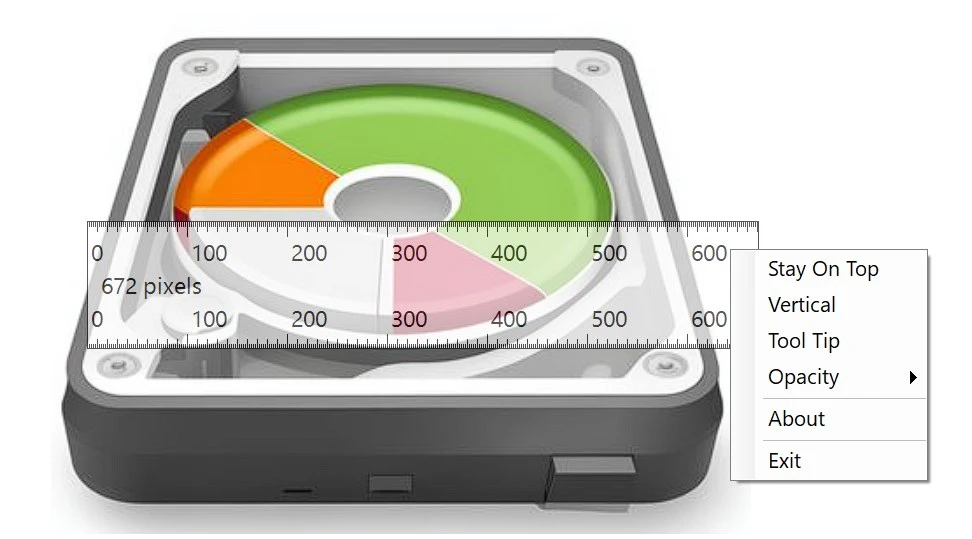
- No installation is required. Launch the .exe program, and a ruler will appear on your desktop. Drag it to where you need it and begin measuring.
- The program is located in the system tray and may be quickly dismissed or relaunched. All controls are accessed by right-clicking.
- You can pin the ruler to the top of any window, which is useful when you need to measure something in a particular software.
- There is a transparency adjustment; you can turn the ruler translucent to view what’s underneath it.
- The line extends to 3860 pixels, which is sufficient for both a 4K monitor and a multi-monitor setup with many Full HD panels.
- You can run multiple rulers at the same time and position any of them vertically, just as in Word, but more precisely.
It lacks the capacity to spin at any angle, horizontally or vertically. There is also no dark theme, which would be handy for individuals who work at night, but it is not currently accessible.
A Ruler for Windows is a viable option; it calculates distances between any places on the screen, but the functionality differs slightly. PicPick – In addition to a ruler, it includes an eyedropper, a protractor, a magnifying glass, and a screenshot tool.