Manual motion tracking in video editing is inefficient and time-consuming. Nero AI Motion Tracker alters everything. This AI-powered technology improves precision and efficiency in video editing workflows. With powerful tracking technology and straightforward controls, you can easily achieve professional-quality results for video creation, footage enhancement, and motion analysis. Automatically track objects, people, or camera movements without needing to change frames by frame. The AI does the heavy lifting, allowing you to focus on creativity. From sports analysis to visual effects, Nero AI Motion Tracker provides precise, dependable tracking that saves hours of work. Improve your video projects with clever, easy motion tracking.
Features of the Nero AI Motion Tracker
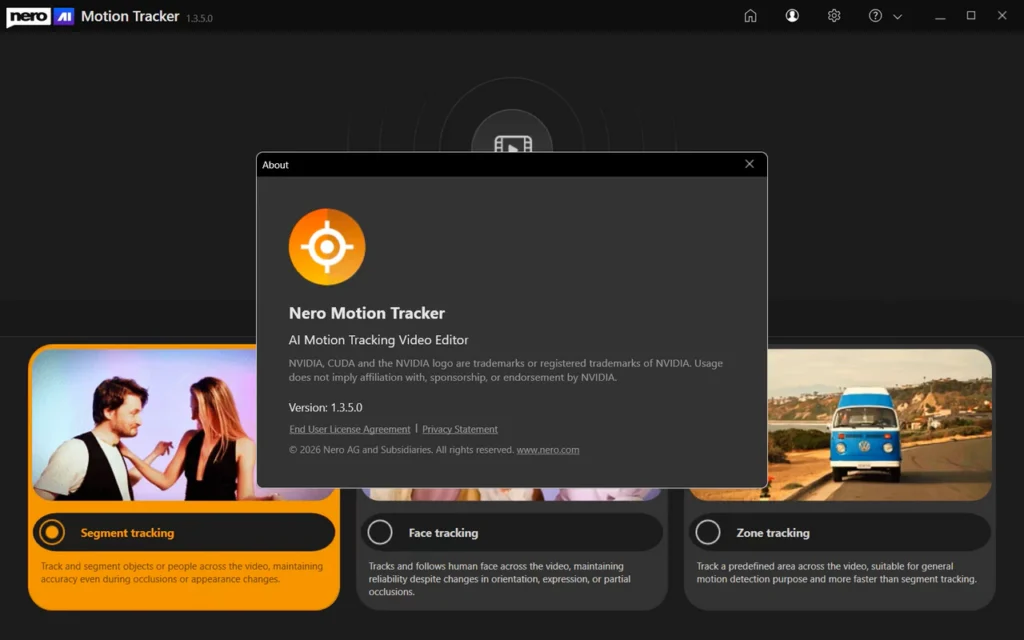
Segment Tracking
Track and segment objects or individuals throughout the video, preserving accuracy even when occlusions or appearances change.
Face Tracking
Tracks and follows human faces across video, retaining accuracy despite changes in orientation, expression, or partial occlusion.
Zone Tracking
Track a preset area of the video, which is ideal for general motion detection and faster than segment tracking.
Track and Segment any item.
Moving subjects frequently change angles, become occluded, or disappear behind others. Manually changing the tracking box frame-by-frame is inefficient and imprecise. Nero’s Segment Tracking allows you to lock onto individuals or objects even when their appearance changes or their faces are obscured. Simply pin text, clip art, or effects to the action and let AI do the heavy lifting.
Auto-detect and protect faces.
Interviews and public recordings frequently feature faces that require anonymity. Editors struggle to keep track of them as they move, turn, or change expression. Use Nero’s Face Tracking to recognize and track human faces in video automatically. Apply mosaic or blur effects to obscure identities without manually editing a single frame.
Fast zone tracking and export.
For general motion detection or covering specialized regions such as license plates, you require a solution that is quick and does not slow down your system. Nero’s Zone Tracking technology covers designated areas faster than other modes. It uses NVIDIA GPU acceleration to process and output your final MP4 without sacrificing video quality.
Minimum System Requirements
- Operating System: Windows 10 64-bit (version 22H2) or Windows 11 64-bit.
- Processor (CPU): Intel Core i5 (8th generation) or AMD Ryzen 5 (3000 series) with at least four physical cores.
- Memory (RAM): 16 GB RAM / Virtual memory (page file), enabled and system-managed.
- Graphics (GPU): NVIDIA GPU supporting CUDA
- Minimum of 6 GB VRAM
- Example: GTX 1660, RTX 2060 (6 GB).
- Driver version that supports CUDA 11+.
- Storage: 20 GB available disk space; SSD is recommended.