LRTimelapse is a professional software application designed specifically to help filmmakers, photographers, and artists create time-lapse videos through editing, keyframing, grading, and rendering. The utility lets you create videos using Adobe After Effects, Lightroom, or Camera RAW.
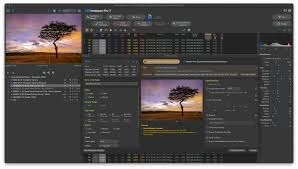
Multi-tabbed layout.
- To get the most out of the tool, you’ll need to spend some time experimenting with its built-in capabilities. You can use the tooltips to view a brief description of each feature, as well as the online tutorials.
- It provides instant access to the files and folders saved on your computer, allowing you to select the ones you wish to process effortlessly. There is a preview panel where you can play or pause the current animation, seek to a keyframe, and enable zoom mode.
- When clicking on a folder, the app automatically builds a list of all detected images. It provides information about each one, including aperture, shutter speed, filename, size, date/time, and more. You may also automatically generate, remove, and set the default keyframe.
Editing and other handy parameters
- LRTimelapse allows you to adjust Adobe Lightroom RAW development parameters over time to improve video quality. Furthermore, you may deflicker your time-lapse movies and use the Holy Grail Workflow to produce seamless transitions between day and night.
- What’s more, you can open the folder with your time-lapse image sequence in Adobe Bridge, change the development settings of the images, and export a JPG sequence. Adobe After Effects can be used to finish and render a sequence, as it fully understands the XMP data provided by LRTimelapse.
A fantastic and extensive tool for time-lapse creators.
- Overall, LRTimelapse is a dependable tool that comes packaged with a complete suite of configuration settings for keyframing and grading of time lapse sequences in any RAW file-based workflow with the aid of the Adobe Camera RAW development engine included in
With Adobe Camera Raw.
Features of LRTimelapse:
- Animate graduated filters
- Deflicker Images
- Saturate or desaturate the photos.
- Fade in/out
- Make Ken Burns effects.