If you’ve ever lost vital files due to a scratched, damaged, or unreadable CD, DVD, or Blu-ray disk, IsoBuster Pro is the solution. This robust data recovery software is designed to recover lost files from optical media, making it a must-have tool for anyone who stores data on CDs, DVDs, or Blu-ray discs. Whether you’re recovering valuable family photos, crucial papers, or system backups, IsoBuster Pro guarantees that no data is lost. Let’s look at what makes this software so useful for data recovery.
What is IsoBuster Pro?
IsoBuster Pro is a highly specialized data recovery program that can recover lost or inaccessible contents from CDs, DVDs, Blu-ray discs, and disc image files. It supports all optical disc formats and file systems, enabling you to access data that your operating system (for example, Windows) may not recognize. With powerful recovery algorithms and an easy-to-use interface, IsoBuster Pro is the best tool for recovering data from damaged or discarded optical media.
Key Features of IsoBuster Pro:
Comprehensive Data Recovery
- Supports All Optical Media: Compatible with CDs, DVDs, Blu-ray discs, and HD DVDs, including CD-R, DVD-R, and BD-R.
- Recover Lost Files: Retrieves data from damaged, scratched, or unreadable CDs.
- Access Older Sessions: Retrieves data from prior sessions on rewritable CDs.
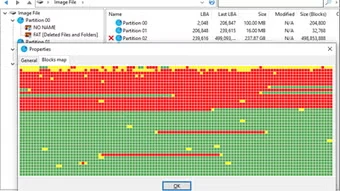
- Scan for Lost Files: This tool searches for lost files and directories using file signatures and file system information.
Advanced File System Support.
- Supports multiple file systems, including ISO9660, Joliet, UDF, HFS, HFS+, and more.
- Mac Resource Fork Support: Recovers Mac-specific data from PC.
- UDF Recovery: Tools designed for recovering UDF file systems used in packet writing.
Disc Image Support
- Open Disc Images: Supports more than 30 disc image formats, including ISO, BIN, NRG, MDF, and DMG.
- Create Disc Images: Save the recovered data as ISO, BIN, or IBP files.
- Checksum Verification: Verifies disc images with MD5 checksum files.
Professional Tools
- Surface Scan: Detects physical read faults on disks.
- Sector Viewer inspects and adjusts individual sectors to improve recovery.
- Audio Extraction: Converts audio tracks into WAV files.
- Bootable Disc Support: Recovers data from bootable CDs and DVDs.
User-Friendly Interface.
- Simple Navigation: Browse tracks, sessions, and file systems like a file explorer.
- Customizable Recovery: Use signatures to add, update, or delete files.
- Command Line Support: Automate tasks with command line parameters.
Why Should I Use IsoBuster Pro for Windows?
- Unrivaled Recovery Capabilities: Recovers data from every form of optical media, even when other tools fail.
- Wide Format Support: Compatible with CDs, DVDs, Blu-ray discs, and more than 30 disc image formats.
- Advanced Tools: Professional-grade surface scanning, sector visualization, and audio extraction.
- Affordable Pricing: Provides professional-level features at a low cost.
How To Use IsoBuster Pro
- Download and install IsoBuster Pro from the official website onto your Windows PC.
- Insert Disc: Place the CD, DVD, or Blu-ray disc in your drive.
- Scan for Data: Allow IsoBuster to scan the disc for tracks, sessions, and file systems.
- Recover Files: Browse the recovered data and extract it to your PC.
- Save Disc Image: Optionally, make a disc image for future usage.
- Export audio tracks to WAV files if necessary.
How to Use the Portable IsoBuster
Using the portable version of IsoBuster is simple. Download the software, extract it to a USB drive, and launch it without installation. Launch the application, insert a disk or load an image file, and then use its sophisticated capabilities to recover lost data, extract information, or repair damaged discs. IsoBuster Portable is ideal for on-the-go data recovery, allowing you to retrieve and restore your files whenever and wherever you need them!
IsoBuster Pro Versus Other Recovery Tools
While there are other data recovery solutions available, IsoBuster Pro stands out for its:
- Specialization: Concentrates solely on optical media recovery.
- Advanced Features: Includes tools for surface scanning, sector viewing, and UDF recovery.
- Wide Format Support: Compatible with all optical disc formats and more than 30 disc image types.
- Ease of Use: Its intuitive design and powerful tools make it suitable for users of all levels.
Frequently asked questions (FAQs)
Is IsoBuster Pro free?
IsoBuster Pro is commercial software; however, it offers a free trial to evaluate its functionality.
Can IsoBuster retrieve data from scratched discs?
Yes, IsoBuster Pro recovers data from damaged CDs with clever error handling and retry techniques.
Does IsoBuster support Blu-ray discs?
Yes, it allows data recovery from Blu-ray discs (BD) and HD DVDs.
Can I retrieve Mac files using a Windows PC?
Yes, IsoBuster Pro supports HFS and HFS+ file systems, allowing you to recover Mac files on a PC.
Final Thoughts
IsoBuster Pro is the ultimate tool for recovering lost or inaccessible data from CDs, DVDs, Blu-ray discs, and disc images. With its powerful recovery techniques, wide format compatibility, and user-friendly interface, this software ensures that no data is lost.
Are you ready to rescue your files? Download IsoBuster Pro today and recover your precious data!