It doesn’t have to be difficult to manage the hosts file on your network! An easy-to-use tool called Hosts File Editor+ was created to assist you in managing and editing the hosts file on your Windows computer. One effective method for rerouting TCP/IP traffic in certain situations is the hosts file, which associates machine names with IP addresses. It’s necessary for complex network configurations, testing, or blocking undesired websites, but it’s not necessary for regular internet use.
Even non-technical users can easily edit the hosts file with Hosts File Editor+ without worrying about syntax mistakes. This application streamlines the procedure, saving you time and effort whether you’re a developer, system administrator, or tech-savvy user.
Are you prepared to take charge of your network configuration? Install Hosts File Editor+ right now. Once you’ve tested it, let me know if I missed any features or whether my review was helpful. Make managing your network easier right now!
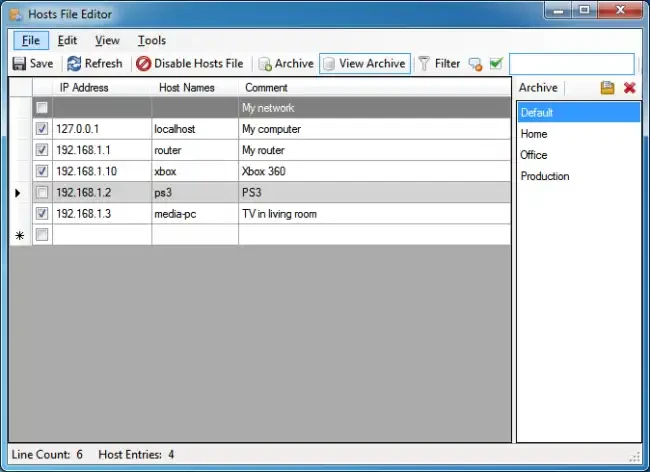
Hosts File Editor+ Features
- Add a new host (hostname and IP address)
- Remove the host
- Save the modifications
- Modify the hosts file’s read-only status
- File for backup hosts
- Use a backup to restore the hosts file.
- Make a new hosts file in C:/Windows/System32/drivers/etc/ if there isn’t one already.
- Import the file (.txt).
- Export the hosts file
- Include a blank row
- Comment (#) Properties (hosts file)
- Items to search
- Change the IP address (127.0.0.1 —> 0.0.0.0; 0.0.0.0 —> 127.0.0.1 and custom).
- To enable double-clicking on the item, edit the selected comment (#).
- Remove entries that are duplicates.
- Choose a comment
- Remove any blank rows.
- Remove the comment lines
- Hosts file: enabled or disabled
- DNS Client Service: Enabled or Disabled
- Block well-known websites (Facebook, YouTube, Twitter, etc.)
- Block Adobe, Microsoft, and Telemetry.
- Restore the hosts file to its original state (Windows XP, Windows Vista, Windows 7, Windows 8, Windows 8.1, Windows 10, Windows Server 2003, Windows Server 2008, Windows Server 2012).
- Install the update list after downloading it (.txt).
- Update the hosts file by installing and uninstalling updates.