Looking for a dependable and free way to protect your Windows PC and data? Hasleo Backup Suite is a free Windows backup and restore software that includes key backup, restore, and cloning capabilities. It is designed for both Windows PCs and Windows Servers and provides a complete approach to data security and system recovery.
Hasleo Backup Suite’s backup and restore feature enables you to simply backup and restore your complete Windows operating system, individual drives, and particular partitions, ensuring the security of your precious data. The cloning option makes it simple to migrate your Windows installation to another disk, allowing you to upgrade to an SSD or a bigger capacity drive. Furthermore, the bootable Windows PE emergency CD can assist you in rapidly and successfully restoring your Windows operating system to a healthy state in the case of a system failure or disk degradation.
Are you ready to protect your Windows PC and data without cost? Download Hasleo Backup Suite now! Benefit from free and dependable backup, restore, and cloning capabilities for your Windows computers and servers.
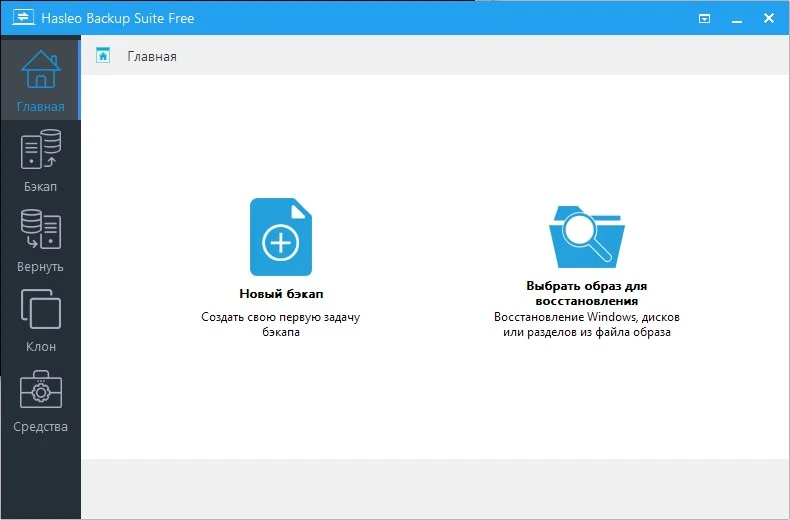
Features of Hasleo Backup Suite:
Highly intuitive looks
This application has a simple design that allows even individuals with limited PC skills to select the operation they want to initiate. You can back up the current Windows installation to an image file, a full disk, or a partition.
Regardless of the one you require, you may specify and adjust a slew of characteristics about it, including compression level, password protection, notification SMTP server, and target email addresses. You can also choose pre- and post-commands.
Even if you are not a tech aware person, you can restore a previously generated task with ease.
Supports cloning operations.
Hasleo Backup Suite can also be used to clone the current operating system to another drive, copy one disk to another, and copy a partition to a different location.
After selecting the source and target locations, you can define the new partition size, alignment (1M, Cylinder, 4K, or none), and enable sector-by-sector cloning.
Packs extra tools.
When utilizing Hasleo Backup Suite, you can rebuild the MBR, wipe a disk, or create a boot menu. If you want to create an emergency CD, you can save it to your connected USB device or export it as an ISO file to burn on a disc later.