GDZSoft CustomFolder Overview
This tool lets you personalize your Windows folders with different colors, icons, and emblems. To access the GUI, press Shift + mouse and right-click any folder. The UI is attractive. You can explore collections and view emblems near the top left. Once applied, you can uninstall or select another stored theme with a single click. It’s a great way to recognize and modify your folders in File Explorer easily. We believe anyone who uses File Explorer will enjoy this program.
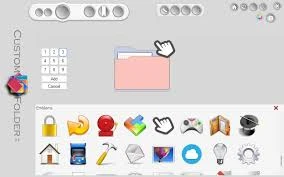
Features of GDZSoft CustomFolder:
lightweight and easy to use.
Customize Windows Folders
Create icons with emblems.
Up to 9 emblems per symbol.
Eight collections, each with 24 icons, can be added.
Easy Configuration Panel
System Requirements and Technical Details
Supported operating systems include Windows 11, Windows 10, Windows 8.1, and Windows 7. Recommended RAM capacity is 2 GB (4 GB).
Free hard disk space: 200 MB or more.