Need to convert documents and images to different formats while maintaining their original appearance? DocuFreezer is a desktop tool that converts your files to PDF, TXT, JPG, TIFF, or PNG, “freezing” the appearance of the input documents and safeguarding them from further changes.
No matter what device is used to show the document, it will look identical to the original. DocuFreezer ensures that your papers maintain their intended formatting and layout.
Are you ready to preserve your papers and ensure a consistent appearance? Download DocuFreezer now! Convert your files effortlessly while maintaining their appearance across all devices.
Features of the DocuFreezer Full
Why DocuFreezer?
DocuFreezer benefits Converting an Adobe PDF document, Word document, Excel spreadsheet, Outlook e-mail, PowerPoint presentation, HTML page, Photoshop image file, XPS file, text file, or JPEG image to another format is typically not an issue. But what if you need to convert a large number of files and do not want to repeat the same steps over and over again? Free File Converter DocuFreezer can help you save time each day.
Simple and easy-to-use interface
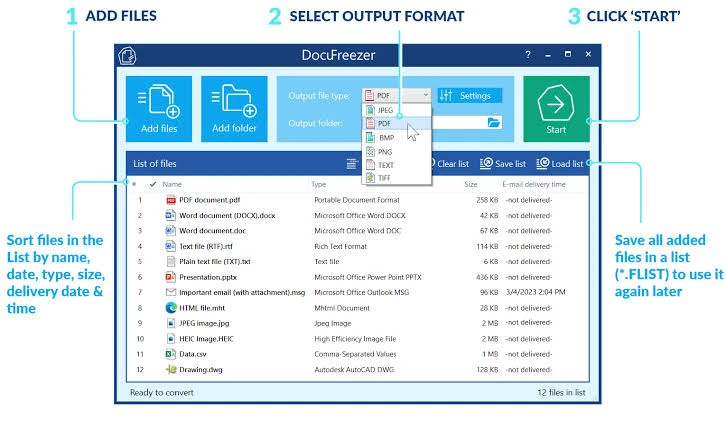
The application interface is straightforward: drag and drop your files, select the output format, and click “Start”. DocuFreezer makes things simple; the program isn’t cluttered with unnecessary settings and features. You can add multiple files, entire folders, or RAR, ZIP, and 7ZIP archives containing documents directly to the main window.
Keeping the original file contents.
DocuFreezer allows you to transform your files and protect them against modification effortlessly. After conversion, the output files retain the original file structure, page layout, text formatting, fonts, and hyperlinks. DocuFreezer also retains the color properties of the source files.
Saving your files as PDFs or pictures
If you need to archive documents, preserve them as backups, or provide a non-editable copy for others, DocuFreezer can help you convert practically any document to PDF, JPG, or TXT. This will allow you to access your files from any modern device, keep them safe, and open them several years later.
Converting many files at once
DocuFreezer software uses a drag-and-drop interface to swiftly and automatically process documents and photos in bulk. Add dozens, if not hundreds, of documents to the list, and they will be converted all at once without the user’s intervention. You no longer need to open and convert each file manually!
70+ input file formats are supported.
DocuFreezer supports over 70 input file extensions (and counting!), including all popular types of documents and images such as Adobe PDF files (.PDF), Microsoft Word documents (.DOC,.DOCX), Microsoft Excel worksheets (.XLS,.XLSX), Microsoft PowerPoint presentations (.PPT,.PPTX), plain and rich text files (.TXT,.RTF), XPS files (.XPS,.OXPS), AutoCAD files (.DWG,.DXF), and more.
Merge and split options for PDF.
DocuFreezer allows you to add multiple PDFs and merge them into a single document, such as creating a multipage PDF from JPG photos. Alternatively, split a huge PDF and extract all pages into multiple single-page files. Furthermore, you can add new files to an existing PDF, such as a cover page at the beginning or an extra page at the conclusion of the document. PDF and TIFF can be merged or divided.
Convert numerous files at once, including PDF to JPG, Word to PDF, TIFF to JPG, and HTML to PDF.
Most programs, including Microsoft Word, OpenOffice, Excel, PowerPoint, and Adobe Acrobat, allow you to export documents to PDF format without the need to install any third-party apps. This is useful when there are only a few documents to process. Still, when there are dozens of them to convert, the work becomes somewhat tedious: you must treat each document individually. Opening each file, saving it as a PDF file, quitting the document, and then repeating the process for the next file can be time-consuming.
Portable DocuFreezer.
Portable DocuFreezer lets you convert documents on the go. Run it from a USB drive to batch convert documents to PDF, JPG, TIFF, or PNG, ensuring they look the same on any platform, no matter where you are.