
A crowded desktop and delayed app switching reduce productivity. Winstep Nexus Ultimate enhances your Windows experience with a professional, feature-rich docking system. Your most frequently used programs are only a click away. Make working with your computer a quick, enjoyable, and interesting experience. Nexus Ultimate is an upgraded version of the free Nexus dock and can be purchased separately or as part of Winstep Xtreme, a comprehensive desktop optimization package. Nexus Ultimate’s fast animations, customizable skins, and powerful features make it simple to open applications, manage tasks, and organize your workflow. Upgrade your desktop. Work smarter, faster, and in style.
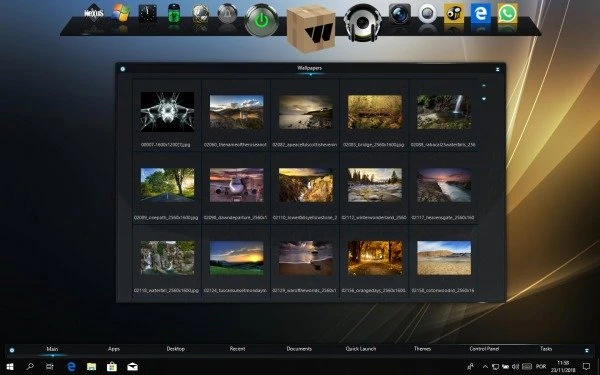
Features of the Winstep Nexus Ultimate
- Display running programs on the dock, including task grouping, filtering, and icon customization options.
- Display the system tray icons on the dock, either individually or in groups.
- Blur-Behind (7/Vista) and Dock Background Colorization.
- Built-in modules/widgets include a time-announcing clock, a recycle bin, an email checker, a weather monitor, CPU, Net, and RAM meters, and Wanda, the swimming ‘fortune cookie’ fish.
- There are almost 80 special commands, including Sleep, Empty Recycler, and CD Control.
- Multiple animation mouse-over, launch, attention, and delete effects, including zoom, swing, bounce, and many more!
- Live symbol reflections and animated water effects.
- Integrated support for animated icons.
- Easily modify the icons of shortcuts and running programs by dropping PNG and ICO image files straight into the icon.
- Minimize windows to the dock.
- Multi-monitor support.
- High-DPI compatibility.
- Compatible with skins for all third-party docks.
- Multiple docks.
- The ability to organize shortcuts into an endless number of nested sub-docks.
- Grid Stacks provide instant access to Folder, Download, and other file contents.
- Shelves can be used to organize apps into user-defined tabs.
- Boost productivity by showing folders such as the Desktop, My Computer, Control Panel, and other virtual system folders on Shelves.
- To reduce clutter, hide desktop icons and use a Shelf’s Desktop tab instead.
- The special Themes tab on a Shelf lets you change themes with a single click.
- Drawers display icons as well as the contents of disk and virtual system folders.
- Additional modules or widgets (e.g., calendar, battery monitor, moon phase).
- More mouse-over, start, attention, and delete effects.
- You can set an unlimited number of clock alarms, scheduled tasks, and reminders.
- Customize the system tray with high-resolution icons.
System requirements
- Compatible with Windows 7, 8, 10, and 11. – Available in 32-bit or 64-bit.
- 500 MHz processor.
- 256 megabytes of RAM.
- 30 megabytes of free hard disk space.
- Screen resolution of 800×600 or above.