Many of my acquaintances believe that monitoring the hardware temperature is meaningless if the machine is functioning properly. But in actuality, it is critical. Overheating frequently causes the CPU to choke, rendering the machine uncomfortably slow in games or demanding applications. Specialist protocols are in place to prevent such surprises. One such tool is Core Temp, a simple but extremely useful utility for real-time CPU temperature monitoring.
Core Temp can be downloaded for free via the link provided below; the installation file is included in the archive.
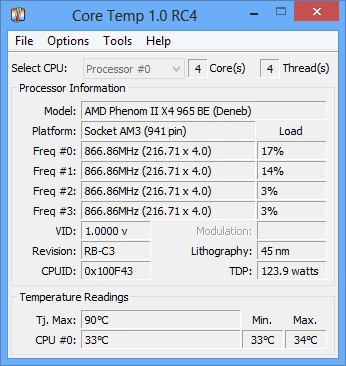
The UI is straightforward and minimalistic. Upon launch, it displays the whole database for your processor, including the precise model, platform, operating frequency, voltage, and TDP. Just below it, you can see your computer’s current power usage and the critical Tj. The maximum temperature at which it will shut down to prevent burnout.
Moreover, it can:
Display temperature and load % for each CPU core. Record minimum and maximum values throughout PC operation. Enable overheating prevention (a warning will be issued).
To keep complete logs of all indicators in the background, press F4. Third-party plugins are supported for displaying charts and widgets on the desktop.
Core Temp displays the CPU temperature in the system tray as small, colored digits. This is useful when gaming in windowed mode or testing heavy software; you don’t have to keep opening the main window to check if your CPU is overheating. Furthermore, the utility collects data directly from the DTS digital heat sensors located within each core. For
For those who require more than just temperature, HWMonitor is a fantastic free option that displays all of your computer’s sensors, including the graphics card and motherboard, along with the rotation speed of each fan. AIDA64 is also available for testing and benchmarking; it monitors all hardware and can put significant strain on the system during stress tests.