Camiael Audio Studio – Overview
It is intended for music producers, podcasters, remix artists, and audiophiles who seek greater control over their audio production. The software divides songs into individual stems using AI technology, including vocals, percussion, bass, guitar, keyboard, and background sounds. This makes editing and remixing far more convenient than dealing with a single audio file. Unlike many cloud-based services, the software handles audio natively on your PC. Your files are kept private because they are not uploaded to external servers. This local processing strategy boosts consumers’ trust when handling personal recordings, professional projects, or sensitive content. Whether you’re making karaoke songs, isolating voices, recovering old recordings, or composing music remixes, the tool offers a comprehensive workflow in one spot. AI Audio Separation Technology One of the most useful features is the powerful AI-powered stem separation mechanism. The software can automatically recognize and extract various parts from music. Instead of hearing everything blended, you may focus on specific pieces. This function is similar to pulling apart a puzzle piece by piece. Once separated, each part is easier to modify, remix, or improve. Creators can use simple editing techniques to remove vocals, isolate sounds, or create bespoke backing tracks. The tool can extract voice, percussion, bass, guitar, keyboard, and accompanying tracks. Its versatility makes it appropriate for musicians, producers, and educators alike. AI HD Audio Restoration: Audio quality may suffer due to compression, poor recording equipment, or aging files. The software has AI HD restoration technology that improves clarity and detail while restoring audio to 48 kHz quality. This enhancing method works similarly to washing a dusty window. Hidden details are more obvious, vocals sound clearer, and instruments gain depth. Users can breathe new life into old recordings and improve audio that was previously dull or muted. Systems with supported NVIDIA graphics cards can experience faster processing and better performance during restoration activities. Multitrack Mixing Environment After isolating audio stems, users can combine them using the built-in mixer. Each track may be modified independently, giving you great control over volume and overall balance. The software simulates a studio setting in which users can experiment with various sound combinations. Do you want louder vocals? Lower the drums? Stronger bass? Everything can be modified using basic controls. This strategy saves time by eliminating the need to switch between applications. Separation, mixing, and exporting can all be done in the same workspace. Genre Presets and Sound Customization Every project has a unique flair and personality. The software contains a variety of genre presets to assist users in easily obtaining the sound they want. Popular genres include ballad, rock, pop/EDM, hip-hop, lo-fi, and others. These presets offer a convenient starting point while also allowing for more advanced modification. Users can fine-tune equalizer settings, modify tonal balance, and create their own audio signatures. The software also includes several unique space effects, such as Concert Hall and Lo-Fi Space. These effects can create ambiance and depth in recordings, making them seem more professional and interesting. Batch Processing for Productivity. Manually processing huge collections of audio files can be time-consuming. To address this issue, the software incorporates batch processing and queue management. Users can upload many files and have the system handle them automatically. This function is especially beneficial to podcast producers, DJs, music teachers, and content creators who routinely work with vast audio archives. Instead of repeating the same procedures over and over, the program runs tasks quickly in the background, allowing creators to concentrate on their products rather than monotonous effort. Privacy and Local Processing Benefits Privacy is becoming more vital in current creative operations. Many online audio tools need users to upload recordings to remote servers before processing begins. The software uses a different approach, running all major operations locally. Files remain on your computer, providing better control over personal data and project security. This method also eliminates worries about upload rates, download delays, and internet connectivity problems during audio processing sessions. Flexible Export Options: After editing is completed, users can export projects in a variety of ways. Individual stems can be stored independently for further production, whereas whole mixes can be exported as finished recordings. Backing-only exports are particularly beneficial for vocalists, music students, and performers who require accompanying tracks for rehearsals or live performances. The software’s adaptability across a variety of creative workflows and production contexts stems from the versatility of its export options. Multilingual User Interface The software supports several languages, including Korean, English, Japanese, and Chinese. This makes the platform accessible to creators from all around the world. The clean design keeps critical controls easily accessible, shortening the learning curve for newcomers while still providing strong tools for expert users.
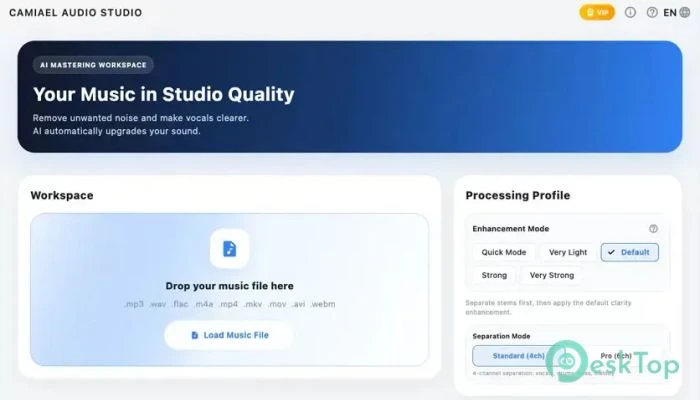
Features of Camiael Audio Studio:
AI stem separation for voices and instrumentals.
48 kHz AI HD audio restoration.
Vocal Remover and Backing Track Creator
Built-in multitrack mixer.
Advanced EQ and tone adjustments.
Audio presets organized by genre.
Concert Hall and Low-Fi Space Effects
Batch processing of numerous files
Long audio and podcast support
Local processing for increased privacy.
Flexible stem and mix export options.
Clean multilingual user interface
System Requirements and Technical Details
Operating System: Windows 11/10.
Processor: Intel Core i5 or AMD Ryzen 5 (minimum); Intel Core i7 or AMD Ryzen 7 (recommended).
Graphics Processor: Intel UHD Graphics or greater (minimum); NVIDIA GeForce RTX 3060 or above (recommended).
DirectX: Version 11 (minimum), DirectX 12 API, Hardware Feature Level 12 (recommended).
RAM: 4GB (16GB or more is recommended.)
Free hard disk space: 10 GB or more is recommended.