
Browser Automation Studio Overview
Browser automation has become a key component of modern digital processes, making them easier to manage. It enables customers to create automated apps without spending numerous hours programming code from scratch. The platform allows you to automate web tasks, manage online data, interact with websites, and handle repetitive tasks all in one place. The tool integrates several technologies into a single environment. It supports browser automation, HTTP requests, email handling, file management, and a variety of other operations. This all-in-one method saves users time and boosts productivity while generating dependable automation projects.
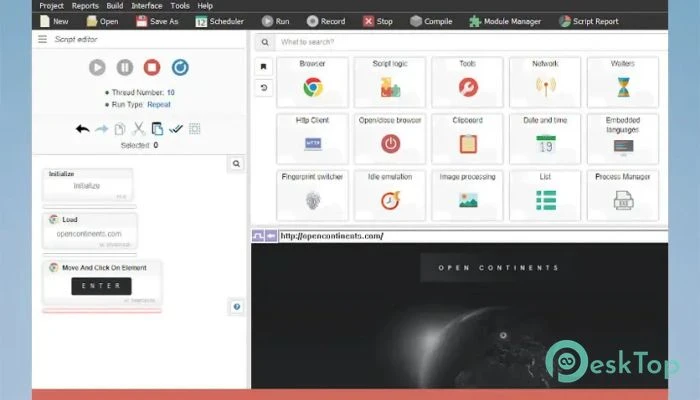
Features of Browser Automation Studio:
Easy-to-use visual interface
One of the most significant benefits of the software is its visual development environment. Rather than dealing with complex code structures, users can design automation workflows using a simple, organized interface.
The scenario panel serves as a guide for your project. Every operation is clearly represented, making it easy to comprehend how the automated process operates. Even beginners can quickly learn to write scripts and handle chores without feeling overwhelmed.
Powerful Toolbar with Organized Modules.
The toolbar contains a diverse set of features organized into many modules. This framework keeps everything orderly and easily accessible. Users can open a single module and complete the task they need without navigating through countless menus.
The built-in search tool makes navigation even faster. Instead of manually searching for categories, users can instantly find the required feature and continue building their projects uninterrupted.
Visual Scenario Builder
The scenario panel is the center of the development environment. It includes the automation script and presents each action in a clear visual format. Consider it a flowchart in which each step leads to the next.
This visual depiction makes troubleshooting and modifying much easier. Users may quickly identify where changes are required and tweak workflows without rewriting major chunks of the project.
Advanced Browser Automation.
The software shines with browser automation. Users can connect with websites in the same way as real people would. Clicking buttons, filling out forms, navigating pages, gathering information, and completing other online operations are all easily automated.
The recording feature is quite useful. Instead of manually creating each step, users can conduct tasks in the browser and have the software record them automatically. This significantly decreases setup time and streamlines project creation.
Automatic Action Recording.
Automatic recording speeds up the creation of automation scripts. Whenever users interact with a website, the program records their actions and translates them into executable steps.
This feature works similarly to having a personal assistant take notes as you work. Once the recording is finished, the captured activities can be altered, enlarged, or customized to meet specific project needs.
Manual Script Customization
While automatic recording is useful, the software also supports manual script writing. Users who require more control can add actions separately and customize every part of the automation process.
This adaptability makes it appropriate for both novice and advanced users. Simple projects can be established fast, while large procedures can be tailored precisely.
HTTP Client Integration
The built-in HTTP client adds another powerful option to communicate with web services. Instead of relying exclusively on browser automation, users can send direct queries to web servers and receive data more effectively.
This strategy frequently increases speed and performance by avoiding needless browser rendering. It is notably handy for collecting data, communicating with APIs, and integrating web services.
Email Automation Capabilities
Email management can take up a significant amount of time, particularly when dealing with repetitive activities. The software features email client capabilities, which enable users to send, receive, and process messages automatically.
This functionality is perfect for customer service, marketing campaigns, alerting systems, and workflow management. Automated email handling reduces manual effort while maintaining consistency and accuracy.
Large Collection of Built-In Libraries.
In addition to browser and email automation, the platform includes several libraries that enhance its capabilities. Users can handle files, databases, text processing, network communication, and a variety of other operations without installing any additional software.
Having everything integrated into a single environment makes work easier and keeps projects structured. It also reduces compatibility issues that often arise when merging multiple external programs.
Suitable for several automation tasks.
The program can be utilized in a variety of businesses and tasks. Businesses can automate repetitive tasks, marketers can run campaigns, researchers can collect data, and developers can design bespoke automation solutions.
Whether the goal is online scraping, account administration, data processing, testing, or workflow automation, the platform offers the tools needed to execute tasks quickly.
Increased productivity and efficiency.
Automation is about saving time, and this solution achieves just that. Tasks that would ordinarily take hours of repetitious work can now be completed automatically in minutes. This allows users to focus on more important tasks while the software handles routine ones.
By decreasing human labor and errors, it improves overall productivity and makes daily routines more reliable.
System Requirements and Technical Details
Operating System: Windows 11, 10, 8.1, and 7.
Processor: Minimum 1 GHz (2.4 GHz is preferred)
RAM: 2GB (4GB or more is recommended.)
Free Hard Disk Space: 2GB or more is recommended.