
VidCoder is a practical and, most significantly, free video converter and DVD/Blu-ray ripper. The second advantage is its open source code, which offers a secure alternative to the most well-known commercial and spyware apps in this area.
This program was based on the similarly well-known Handbrake, which was cross-platform, performed well during conversion, was open source, and earned popularity among thousands of users. However, the vast majority of Windows users detested Handbrake’s interface, which was initially developed for Mac users and was not particularly user-friendly. RandomEngy, the creator of VidCoder, set out to tackle this problem, and, based on the reviews, it was successful.
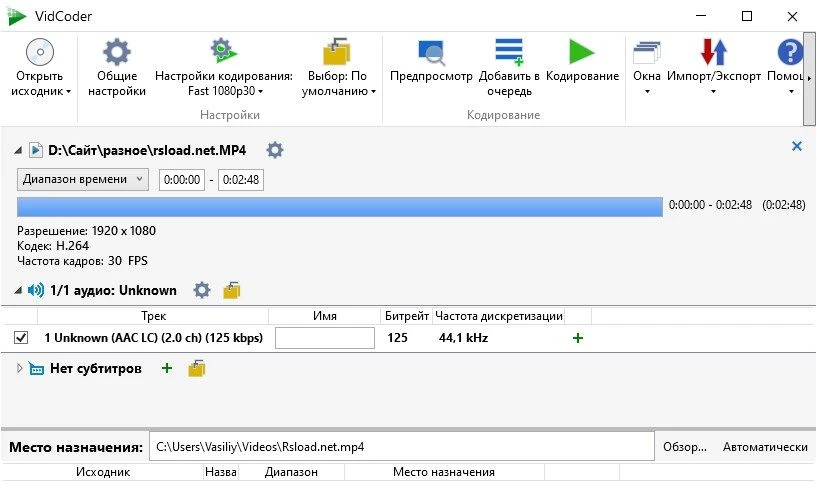
How To Work:
- To begin, insert a DVD or Blu-ray disc into the drive. Specify the destination folder for the produced files. Finally, choose a set of parameters. Fortunately, there are several options availableavailable, and anyone can find the one that works best for them. You can even make your own if you consider yourself an expert user in this field.
- VidCoder will automatically do all necessary manipulations, so all you have to do is wait for the conversion process to finish.
- There will be an MP4 or MKV file in front of you, and, as you are aware, these can be played on nearly any media player, watched on a computer, and so on without problems.
VidCoder lets you create videos for Apple devices. Don’t forget that you may change all of the conversion and decoding parameters yourself, so even pros will be satisfied. The software requires the .NET Framework 4.0 or higher to run—and, to avoid any complaints later, I’ll warn you straight away that this isn’t a disadvantage for me, but it’s still worth mentioning. Overall, I don’t think I have much else to say about the program. I hope it enables you to convert your video to the format you require rapidly and watch it while sitting in front of your television.