Several visitors of our site have asked me to add DISMTools to our collection, which I am now doing. This project aims to make it easier to work with Windows pictures. Don’t worry, I’m not an expert in this sector, but I’ll do my best to explain everything so that everyone understands.
Let’s begin with a basic example: pretend you have a digital copy of Windows. This duplicate, known as an “image,” is a blueprint of your operating system in the required format. Sometimes you may need to update or correct something in this image. If you understand what I’m saying, you’ve probably guessed what DISMTools performs.
The application is similar to DISM but includes a graphical interface, user-friendly controls, clear functionality, help for all settings, and more.
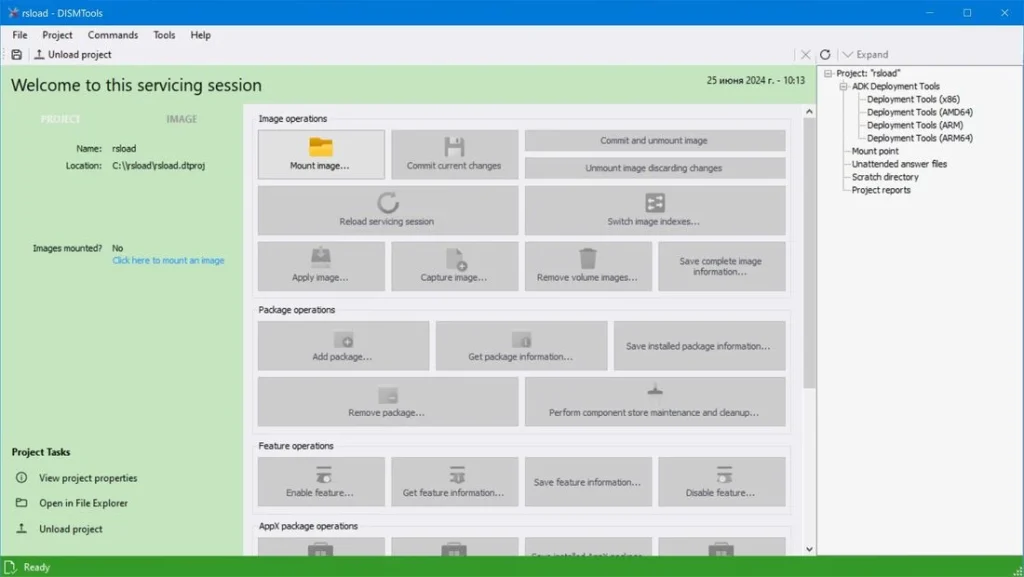
Let us have a closer look at what DISMTools can do:
- Allows you to view and change Windows pictures.
- You can modify these graphics by adding or removing apps and features.
- Will enable you to repair potentially damaged Windows images.
- You can back up your machine.
- Prepares system images for installation on other computers.
Finally, the utility replaces complicated DISM commands with easy buttons and menus. You’ll find it straightforward; there’s no need to recall or enter lengthy commands; everything is done with clear buttons and step-by-step directions.
There are two operating modes: Online, which resolves faults directly in a current Windows installation, and Offline, which prepares or restores the system using ISO images.
The application also has a feature called “Image Optimization.” This feature reduces the size of the system copy, which is handy for saving space or transferring the image to another computer.
For individuals who enjoy customizing their Windows, DISMTools provides options to add or remove specific OS components. This means you can tailor your OS installation to include only what you need.
Essentially, it functions as a “Swiss Army knife” for handling operating system images. The program takes a sophisticated set of tools and presents them in an easy-to-use format. Whether you’re an IT veteran or a novice who enjoys tinkering with your own system, this software can make your life easier.