
MassCode Overview
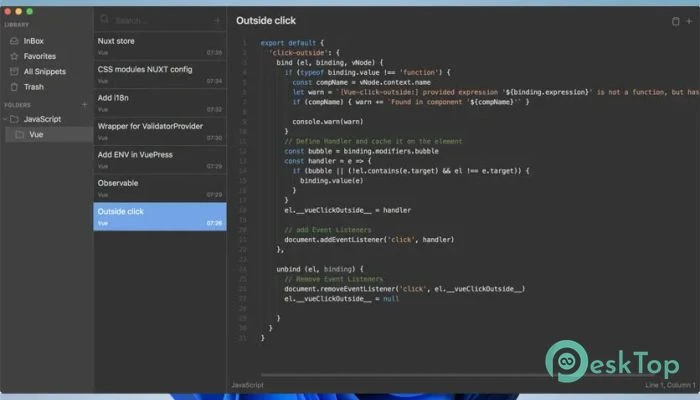
This application is intended for developers who are bored with combing through random text files to find a little piece of reusable code. It functions like a digital toolbox, with each sample having its own place. Instead of wasting time on searching, you can concentrate on creating real projects. At its core, the software provides a modern editing experience. It employs the Monaco Editor, the same engine that drives Visual Studio Code. That means you get a professional coding experience within a lightweight snippet manager. It feels familiar, quick, and responsive from the first click.
Features of massCode:
Monaco powers Modern Editor.
One of the software’s most notable features is its sophisticated editor. It leverages Monaco, so you get smart suggestions as you type, much like in a full IDE. Here’s where IntelliSense shines. It guesses what you’re writing and suggests useful completions, sparing you from having to input long structures repeatedly.
It also offers validation for major programming languages and formats, including TypeScript, JavaScript, CSS, LESS, SCSS, JSON, and HTML. That means if you make a minor error, you’ll notice it right away. Consider it like having a quiet assistant watching over your shoulder, gently pointing out mistakes before they become major issues.
Three-Column Interface for Improved Organization
The layout is simple but very effective. The interface is organized into three columns, each serving a specific purpose. This design keeps everything visible and manageable.
The first column lists your full snippet collection. It functions as a bookshelf. You can view all of your folders and collections in one spot. This allows you to easily structure your work around projects, technology, or clients.
The second column displays the snippets within the selected place. When you select a folder from the library, all relevant code parts are displayed here. It’s like opening a drawer and finding everything nicely ordered.
The third column is where the magic occurs. This is the coding editor. You may view and edit your snippet in real-time. Separating the structure and editing area allows you to work efficiently and without distractions.
Open source and completely free.
Another significant advantage is that the program is open-source. This means that anyone can inspect the code, contribute to its development, or modify it to meet their own requirements. There are no hidden costs, restricted services, or forced subscriptions.
Being open source also increases trust. You are well aware of what you are using. For developers who value transparency, this is a major advantage. It’s like driving a car with the hood open. You can see how everything works internally.
Perfect for developers and teams.
This tool is appropriate for both individual developers and small teams. If you frequently repeat functions, configuration blocks, or UI components, keeping them organized saves you hours of effort.
Instead of duplicating code from previous projects, you may open your snippet library and select what you need. It simplifies repeated processes into a rapid copy-and-paste activity while maintaining structure and control.
It works seamlessly with many programming languages. Built-in language support and syntax highlighting keep your code readable and manageable.
Clean Workflow and Productivity Boost.
The interface’s simplicity keeps your mind focused. There are no extra panels or complicated menus. Everything is where you would expect it to be.
When you open the software, you will see your library, snippets, and editor. That’s it. This concentrated design reduces distraction and allows you to think clearly. It seems like working on a clean desk rather than a cluttered one.
Over time, this clear structure improves productivity. You spend less time looking and more time creating. Small efficiency benefits add up rapidly, especially if you code every day.
Flexible Storage and Easy Management
Managing snippets becomes simpler and more systematic. You can sort them by category, technology, or project. Renaming, modifying, and transferring snippets between directories is simple.
Because everything is saved in a logical library system, you avoid the mess of scattered text files. It becomes your personal code collection, clearly labeled and easy to navigate.
This organized method is very advantageous for those who work with a large number of small reusable components. Rather than reinventing the wheel, you choose one from your collection.
System Requirements and Technical Details
Operating System: Windows 11, 10, 8.1, and 7.
Processor: Minimum 1 GHz (2.4 GHz is preferred)
RAM: 2GB (4GB or more is recommended.)
Free Hard Disk Space: 200 MB or more is recommended.