
Many of you have expressed interest in adding GiliSoft AI Toolkit to our portfolio. Okay, here it is. You’ll get a variety of AI-powered applications and a simple, user-friendly UI. All of these tools aim to develop an assistant capable of handling a wide range of activities, including text, video, audio, photographs, and more.
Among the many features, one stands out: a built-in AI bot that works like popular chatbots such as ChatGPT. You can easily strike up a discussion with it, asking questions and receiving responses on a variety of topics, and you will comprehend the terminology used. The program is sophisticated enough to manage multiple discussions simultaneously and can also assist with tasks such as translation and spreadsheet work.
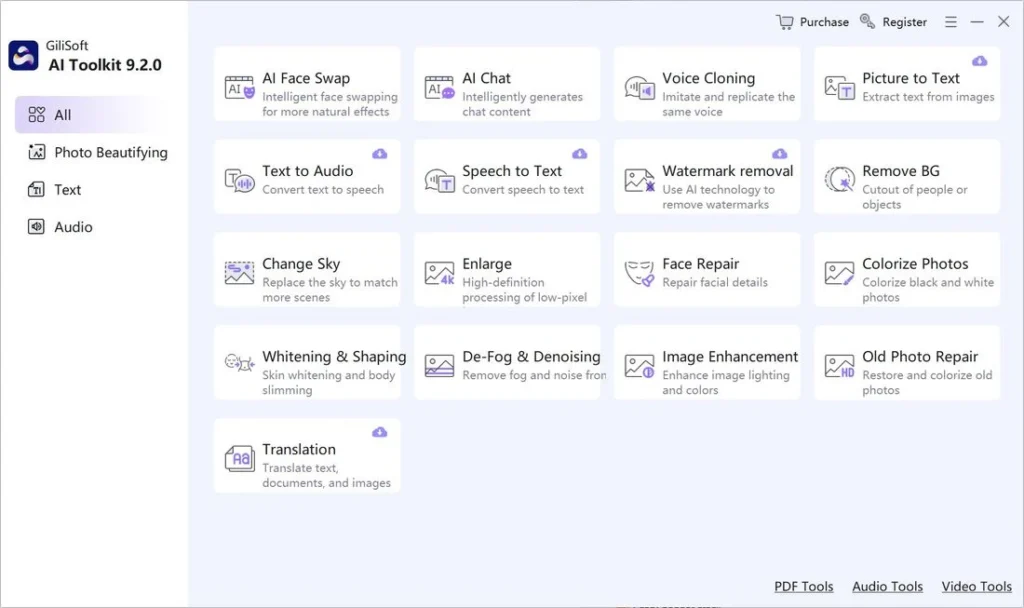
Let’s check out some of its features:
- You’ll get a variety of tools, including OCR capability for recognizing text in documents. This capability extracts text from a variety of image formats, including scanned documents. I find this quite handy for digitizing printed items or extracting text from photographs.
- The conversion options do not end there; you may also convert text to speech and vice versa. Assume you have written content and need to translate it into spoken language, or vice versa. No issue; the application will gladly offer you these features.
- A built-in text translation tool is also available, which is a convenient function. You’ll get three algorithms, or alternative ways. The first is appropriate for simple text from a notepad, the second allows you to interact with papers, and the third can translate text from photographs.
- If you have an image with a copyright or so-called watermark, this software will allow you to process the image and competently remove the copyright, striving to do so as carefully as possible so that no signs of blurring are obvious.
Is that still not enough for you? Need more? Okay, I am getting off subject. GiliSoft AI Toolkit was designed to bring all of these capabilities together in one location, power them with artificial intelligence for ease of use and tooltips, and wrap everything up in a user-friendly interface. This means you won’t have to jump between apps or learn how to use various tools. Everything is available from a single centralized control panel, which is really convenient. The only disadvantage is a lack of Russian assistance, but for some, this will not be a problem because everything is generally apparent.
As you can see from the screenshot, the program contains a large variety of features. Choose a category on the left, and all of the tools will appear on the right. There are literally dozens of them. I’ve only highlighted a handful that are more useful or intriguing, and you can discover the rest for yourself as you work.
Activating GiliSoft AI Toolkit with a crack or inputting a license key will allow you to register the program. In either case, the archive provides a simple activation method that requires no purchases. After running the program, you’ll be greeted with a versatile and user-friendly assistant that will gladly employ artificial intelligence to help you with nearly any work.
You may extract text from photos, instantly translate documents, convert audio to text, remove copyrights, and modify music and video—it’s all available. Its all-in-one approach makes the software particularly interesting to users who require a comprehensive solution without having to manage numerous different applications.