Winhance is a heavy-duty program for cleaning and configuring Windows 10 and 11. It removes built-in junk and improves system performance. If you’ve ever done debloat after installing Windows, you know how tedious it is; you normally have to enter PowerShell, copy scripts, and figure out what can and cannot be erased. All of this is accomplished using a standard, intuitive interface.
You can download Winhance for free at the site provided below; activation is not required.
The problem with the operating system is that it comes preloaded with a slew of programs and components that most consumers do not require. Cortana, Xbox Game Bar, built-in games, weather, news—all of this hangs in memory, consumes resources, and collects data about you. Winhance allows you to clean everything securely and without risk.
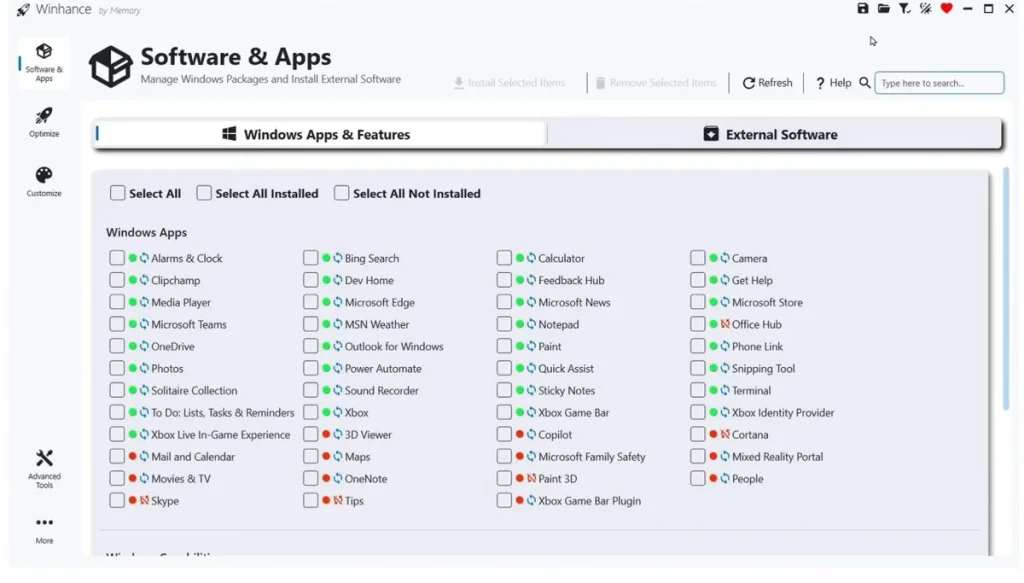
The program operates in four areas:
- The first is debloat, which removes unneeded built-in Windows applications and components.
- The second optimization, customizing the system for performance and privacy, will also be useful for gamers, as it allows you to block everything that interferes with gaming.
- Third, customize the themes, taskbar, start menu, and explorer to your liking.
- The fourth option is automation; you may generate a custom Windows installation image with the settings already applied, install the system, and it will be immediately clean and free of unnecessary components.
The last thing I’d like to bring up is that if you frequently reinstall the system for yourself or others, creating a custom image will save you a lot of time.
Features:
- Safely uninstall Windows built-in apps.
- Optimize performance and privacy.
- Adjust the UI, taskbar, Start menu, and File Explorer.
- Creating custom installation images
- Automation of settings during system installation.
- Compatible with Windows 10 and 11, it has a user-friendly interface that does not require PowerShell scripts.
There are analogues, such as O&O ShutUp10, which is more focused on privacy and eliminating telemetry; the debloat does not create programs, but it covers more privacy options than Winhance.
If you don’t want to rummage around in scripts but want a clean system at the end, the application will help.