I come across this program all the time, and I’ve been hesitant to discuss it because I assumed it was no longer available, but I’ll take the time. So here’s Red Burner, an easy-to-use tool for burning large-capacity CDs, DVDs, and Blu-rays. It’s a useful and powerful application that lets you burn disc images, copy discs, copy audio CDs, erase discs, and more.
Nowadays, few people use CDs, let alone write on them. However, it remains a hot topic in enterprises; therefore, simple software is always a good choice. It’s not particularly visually pleasing, but it’s adequate for the task at hand.
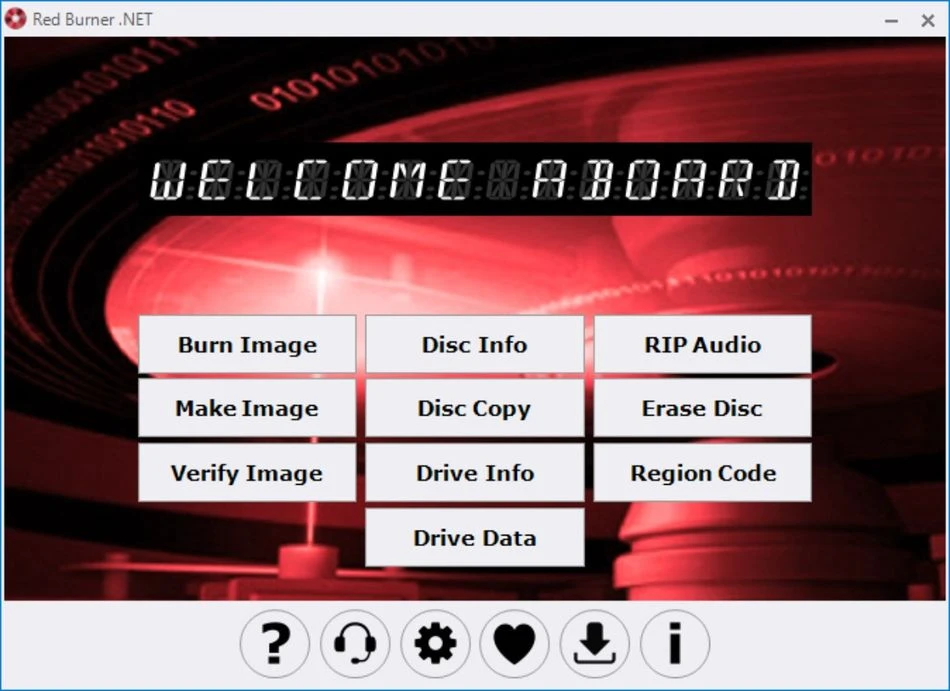
Here are a few of its features:
- It can burn disc pictures onto a blank CD and supports a variety of recording modes, including TAO/DAO/96.
- The drive’s manufacturer, exact size, available space, number of sessions and tracks, maximum read and write speed, compression level, and encryption are all displayed and accessible immediately after pressing the button in the main window.
- Red Burner lets you copy disks, creating backup copies or duplicates in just three clicks.
- The software extracts audio tracks from CDs and saves them to your computer.
- Full-disk erasure is also supported.
Let us move on to some of the benefits:
Simple and convenient.
The application takes relatively little space and is suitable for users with low memory.
No installation is necessary, and the tool is totally portable.
The program can quickly read and understand a wide range of discs, including ISO, IMG, CUE, and others.
That is all I wanted to tell you. I hope this program is beneficial. Once started, you’ll discover dependable software that’s simple to use, even if it’s not visually beautiful. You’ll find it lightweight, simple to use, and full of features. Whether you need to burn data or audio CDs, replicate discs, or obtain precise information about your discs, Red Burner can undoubtedly help.