
I want to introduce you to a cross-platform client that lets you use the BitTorrent file-sharing network. I’m sure you’re aware of its huge extent and the ease with which files can be downloaded from it. Our project only provides a Windows version, but you can download versions for other operating systems, including Linux, on the official website. If you want to try it out, I propose getting qBittorrent from our project (read the whole story).
The program’s interface is extremely similar to uTorrent, making it fairly simple to use. Russian support is available; after selecting it, restart the software. qBittorrent allows you to download files in a consecutive order. The interface can be adjusted to meet your requirements. You also get a user-friendly search engine. You can also search for files on prominent BitTorrent sites and use any file extension available on this network.
qBittorrent supports DHT, Peer Exchange, and other features. You can also control the program’s interface remotely (which is useful when you’re not near your computer). You can define priorities and queue files to download first. Of course, qBittorrent allows you to generate your own torrent distributions. It also supports RSS and IPv6. So that is a summary of the program. I hope you like the client. Enjoy!
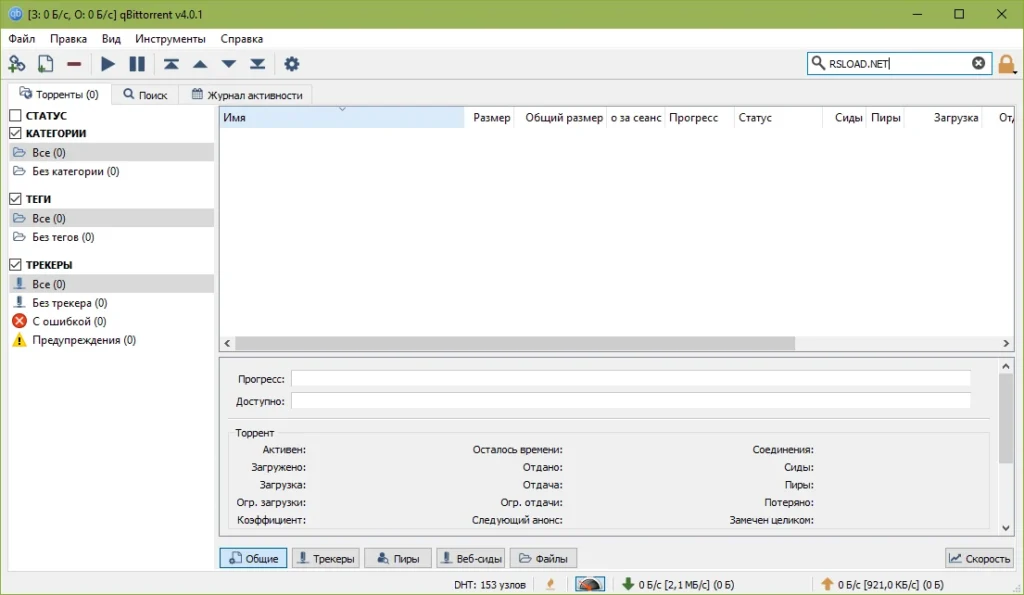
Peculiarities:
- Cross-platform compatibility: supported by Windows, macOS, Linux, and some other operating systems.
- Built-in torrent search engine: Integrates with multiple torrent search engines, allowing users to search for torrents easily.
- Protocol Encryption: Supports the Joint Protocol Encryption Specification, which is compatible with most BitTorrent clients.
- qBittorrent supports the UPnP and NAT-PMP protocols, which automatically set up your router for incoming connections.
- Consecutive download: This function lets you download files in consecutive order, which is great for downloading videos.
- Bandwidth Scheduler: You can specify particular download and upload restrictions for qBittorrent.
- IP Filtering: The application includes IP filtering, allowing you to block undesired peers by IP address.
- The client supports RSS feeds, allowing you to subscribe to and download content.
- Advanced Torrent Control: Provides comprehensive control over torrents, including the ability to prioritize, pause, and resume downloads, and to limit upload and download speeds.
- It also includes a built-in utility for creating and sharing torrents.