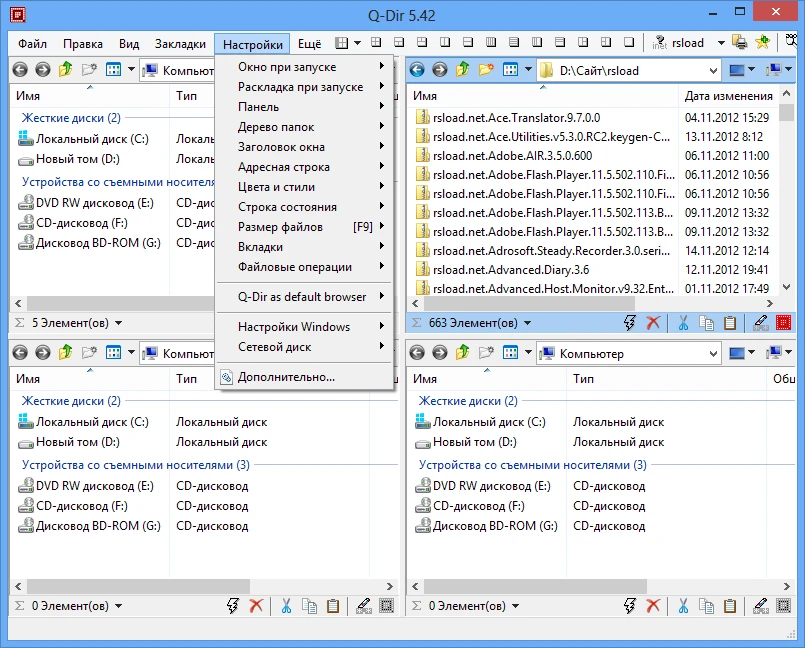
Q-Dir is a functional file manager that stands out for its four-pane layout. It’s a great, powerful alternative to the conventional Windows Explorer, and it’s ideal for anyone who needs to manage multiple directories at once.
I like the Q-Dir principle. Of course, it takes some getting accustomed to, but the most critical aspect is the desire. The manager supports a variety of archive formats, and you do not need to install third-party software to unpack them. Furthermore, you may easily add or transfer a file or folder from one window to another by dragging it with your mouse. Essentially, it is a simple drag-and-drop feature.
Key Points:
- Having four panels open simultaneously is ideal for multitasking and complex file operations.
- I loved the color coding, which now highlights files and folders in different hues. Visuals are crucial, and once you’re used to them, you’ll be able to find what you need without having to read it.
- Favorite folder combinations will let you access commonly used directories; add them to the list, and you won’t have to travel through nested folders every time.
- You can choose distinct colors for file types and tabs for each key combination.
- Analyzing folder sizes reveals how much space each folder occupies.
- Please keep in mind that sophisticated operations will run faster than they would in the standard Explorer.
One significant advantage of Q-Dir 64-bit in Russian is that it does not require installation and may be run from a media drive. This means you can efficiently utilize your favorite software when you visit a friend’s house—a significant advantage, you’ll agree. The interface supports Russian. When you initially launch it, you’ll need to accept the terms and conditions and choose your preferred localization. Following that, you will be able to use the program without any time or feature constraints.
Pros:
- Having four windows instead of two is cool.
- Everything in Russian is convenient.
- All regular procedures for files are completed appropriately.
- The ability to interact with specific formats directly from the program window is really appreciated.
- Lightweight, many features, and much more convenient file handling—a lot of advantages.