
Knowing who has access to which folders on a PC is critical, especially on a work machine or server. The NTFS Permissions Reporter is built explicitly for this purpose. The makers say that it is one of the quickest solutions for creating access permissions reports. You can download it below; this is the Enterprise version with a key, which is free to use.
Windows includes built-in permissions viewing functionality. The context menu in File Explorer displays permissions, which may also be viewed using PowerShell commands. However, all of this is problematic: the data is dispersed across multiple areas, and the display is confusing.
NTFS Permissions Reporter addresses this issue. Select a folder or disk, run a scan, and receive a report containing all permissions in one location. You can view which users and groups have access, what permissions they have, and other relevant information.
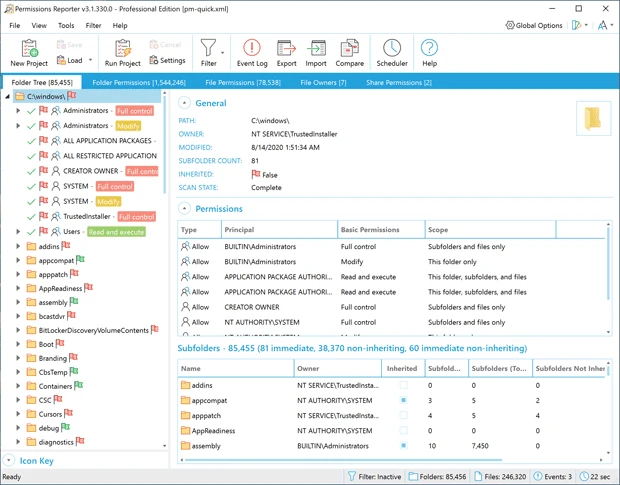
The results can be filtered and sorted, and reports can be exported as HTML, CSV, or Excel. This is a valuable tool for administrators who oversee security and access rights.
Even with massive file structures containing many nested folders, the application runs rapidly. The interface is simple, and whether you need to audit rights or clean things up, the application completes the process fast and consistently.
- If you can’t recall the path to a network share, the tool provides a server entry box that displays all shares and allows you to select the ones you need.
- In general, you can make a list of folders before generating reports. If you’re already in the directory whose permissions you want to verify, there’s no need to start the application and then input the current path.
- The privilege overview is displayed as a tree or a table, indicating whether the required rights were explicitly assigned to the directory or inherited.
- The tool also reveals when rights were granted to people or groups that are no longer active—a valuable tool for huge businesses and administrators.