Looking for a way to make captivating lyric videos or karaoke presentations? Lyric Video Creator is here to help! This tool combines background music with scrolling Text or lyrics, making it ideal for generating YouTube videos, party entertainment, and professional karaoke sessions.
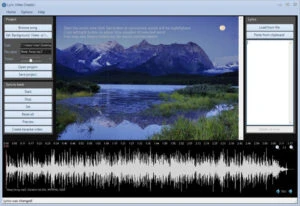
Lyric Video Creator offers a sleek, easy-to-use interface that resembles a traditional multimedia player while still providing extensive production options. Load videos or photos onto the preview screen, add lyrics from text files, and change the background effects. The waveform-supported audio editor ensures that music and lyrics are perfectly synchronised.
You may also adjust timing, font styles, colours, and encoding parameters in a single window, saving you time and work. Whether you’re a beginner or a master, Lyric Video Creator makes it simple to create high-quality lyric films.
Ready to make your own music videos? Download and install Lyric Video Creator now! Once you’ve experienced it, let us know how the review compares to your experience. Did we cover all of your favourite features? If you notice anything missing, please leave a comment below. Start making amazing lyric videos right now!
Features of the Lyric Video Creator
Quickly export an altered file. • Once all of the options have been finalised, conduct a test run and then click the “Save Project” button to create the file. You can export it as AVI or MP4.
Lyrics on the video background. • The best software for making video presentations or karaoke songs • Add Text to custom backgrounds (pictures or videos) with background music!
Customised Background • Use a “video” background or a static image.
Background music. • Import your favourite songs or convert an MP3 to Video Karaoke.
Sliding Text • Sliding Text across one or more lines, aligned as desired.
Syncronization • Create a “Lyric Video” by synchronising Text and music.
System requirements
Windows 11/10 (32 and 64-bit), Windows 8/7/Vista, and XP
Benefits of Lyric Video Creator Portable Edition:
The portable version of Lyric Video Creator is ideal for those who wish to use the software without installing it on their computer. You may carry the portable file on a USB flash drive and execute it on any Windows PC immediately. It does not affect your Windows registry or leave any leftover files, so your system remains clean and optimised.