In front of you is a fairly easy-to-use photo editor with a large number of interesting effects. If you wish, you can batch-process files. Thanks to the two-panel interface, you can immediately see the result of your edits, with the original image on the left. On the right, what you have edited. You can download FotoSketcher from our project; for this, you need to go to the full news, as always.
During the program installation, be careful: you do not want to install all sorts of toolbars into the system, so do not rush. After launching, we immediately see a beautiful parrot; it’s like a demonstration of what FotoSketcher can do. On the left, there will be the original, and on the right, a processed image; it certainly looks spectacular. You can add your images quite easily. You can move them to the main window with the mouse. Of course, you can open a new image through the Menu. It is worth highlighting the stylish interface: it is quite easy to understand and pleasant to work with. Plus, there is Russian support, which lets you quickly understand all the settings.
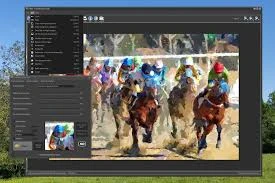
So, FotoSketcher will allow you to resize the original image using a simple tool while maintaining the best possible quality, that is, without distortions. You can increase sharpness and auto-contrast, rotate your image to the right or left, change the original image with F9, overlay text on the picture, and view file parameters.
FotoSketcher has a couple of dozen good effects; they are easy to apply and customise, and some of them look quite beautiful. In. In general, you can change the original image quite a lot. The program is distributed free of charge. There. There is a portable version that does not require installation and can be transferred to any drive. I have nothing to add about the program. It will be useful in the household. Do not forget to comment on the news and express our opinions about FotoSketcher. If you really liked the development, you can donate to the author on the official website.