
Discover Diamond Cut Audio Restoration Tools, the ideal solution for restoring and improving audio quality in Windows. Diamond Cut Productions created this software suite to revitalize audio from a variety of sources, including vinyl records and tapes. It’s a must-have for anyone wishing to revitalize old audio recordings, thanks to its user-friendly interface and strong capabilities. Download now from the developer’s website to experience the difference!
- Audio Restoration and Enhancement
- Create MP3s of your favorite songs.
- Clean up your old records and tapes.
- Make CDs of your favorite songs.
- Clean up recorded chats, speeches, and concerts.
- File transcription, time expansion, speed, and/or pitch change.
- Organize and play all your music.
- Add effects and additions to your music on the fly.
- Audio and Acoustical Measurements
- Audio File Format Conversion
- Statistical Measurement Tools
- There’s much more.
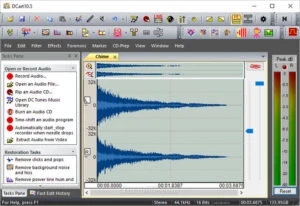
Features of Diamond Cut Audio Restoration Tools:
Easy to use
- Green zones will guide filter slider settings.
- The Tasks Pane feature takes you to the appropriate filter.
- Updated GUI Appearance
- VST Hosting (Plug-in Support)
- Waveform Overview for efficiently navigating a file
- tabbed display or classic multi-window view.
- Larger and fully customisable toolbar icons
- One-Click Switch Between Fast and Classic Edit Modes
- Improved tracking of all editing functions in traditional editing mode between source and destination files.
- Quickly access Spectrogram or Histogram views from the main window.
- Changed the software application’s “look” to match multiple flavors of Windows.
- When dealing with tablet PCs, paste the Interpolate Icon button to enable easy waveform interpolation.
- You can easily check for updates from the help menu.
- Customizable keyboard accelerators
- Customizable Application Look
- Enhancements and improvements to existing features
Wind Noise Filter
- VST Hosting (Up to 6 VST Plug-ins at one time)
- AAC (Advanced Audio Coding) compressed audio file support has been introduced for file extensions such as .aac, .m4aas .aac, .m4a, and others.
- Vertical setting for the Virtual Phono Preamp.
- Improved the audio quality of the Stretch and Squish (pitch and tempo change) system.
- The Low-Frequency Shelf option has been introduced to the Paragraphic EQ.
- Over 2,000 Descriptive Factory Presets are now available to make “getting started” with any given function easier.
- The sampling rate range is 192-210 kHz, with a bandwidth of up to 100 kHz.
- The “Set New Start Time for File” option has been introduced.
- Set a file time offset to track time in multipart files.
- Overtone and subharmonic synthesizer filters now support offsets, resulting in a more realistic sound.
- Added the “Delete All Filters” right menu option to the Multifilter.