CustomFolder is free Windows software that lets you change the icons and colors of folders. If you’re fed up with the normal Explorer view and its identical yellow folders, this software will clean up your desktop and brighten the interface. It is now simple to change the appearance of directories, customize their colors, and add icons, making it easier to find files.
This free version does not require activation, and you can find the most recent version of CustomFolder below.
This freeware provides you with complete control over Windows Explorer. You can modify the folder color and add useful icons to it. For example, you can put a lock on a secret folder, an exclamation mark on essential documents, or a musical note on your media library. The database contains pre-made icons, but you may also contribute your own images in ICO or PNG format.
The program lets you use any photo as a folder backdrop. If you want to showcase a project on your computer visually, this is an excellent choice. The tool is fast, does not hang in processes, and is compatible with Windows 11. A quick reset option is also available.
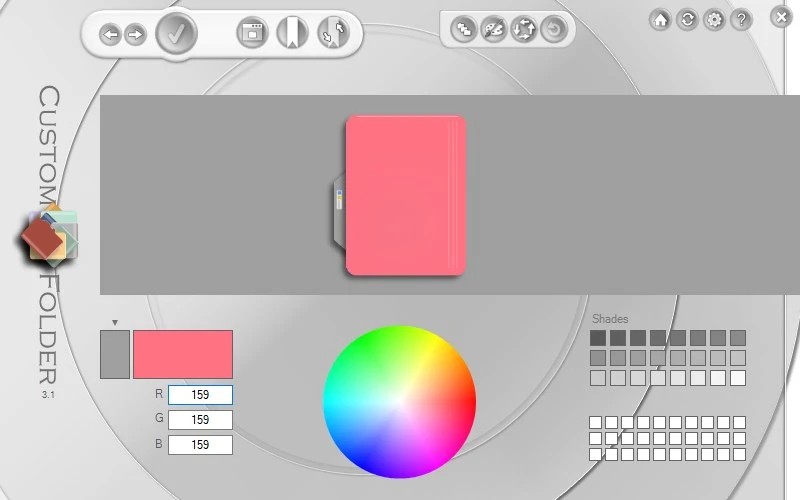
Pros:
- User-friendly UI with built-in preview.
- Support for PNG and ICO pictures.
- Create your own template collections for faster, less resource-intensive operations.
Similar apps:
Folder Marker is a well-known folder coloring application. Although expensive, the Folder Colorizer program is also available for free. It’s a simple way to change folder colors using the context menu.
Responses to frequently requested questions:
If I’m weary of the default folder appearance, how can I change it back?
Within the application, select a folder and then click the reset option.
Will the altered directories be viewable on another computer?
Yes, when you move a folder, the settings are stored in the hidden desktop.ini configuration file.