CrystalMark Retro is a retro benchmark for evaluating your PC. The name is self-explanatory, but let’s go further. Many people are still unsure about the full potential of home hardware. This app will test your computer or laptop’s performance with a single click. It thoroughly tests the hardware, including the processor, memory, storage, and graphics cards. The outcome is a visual evaluation of the entire system’s health.
CrystalMark Retro can be downloaded for free via the link provided below. The archive contains both a clean version and a repack. Here’s how the program tests your system:
The utility’s developer decided to resurrect a famous benchmark from the 2000s and tweak it for current processors. Close any other programs before conducting the tests.
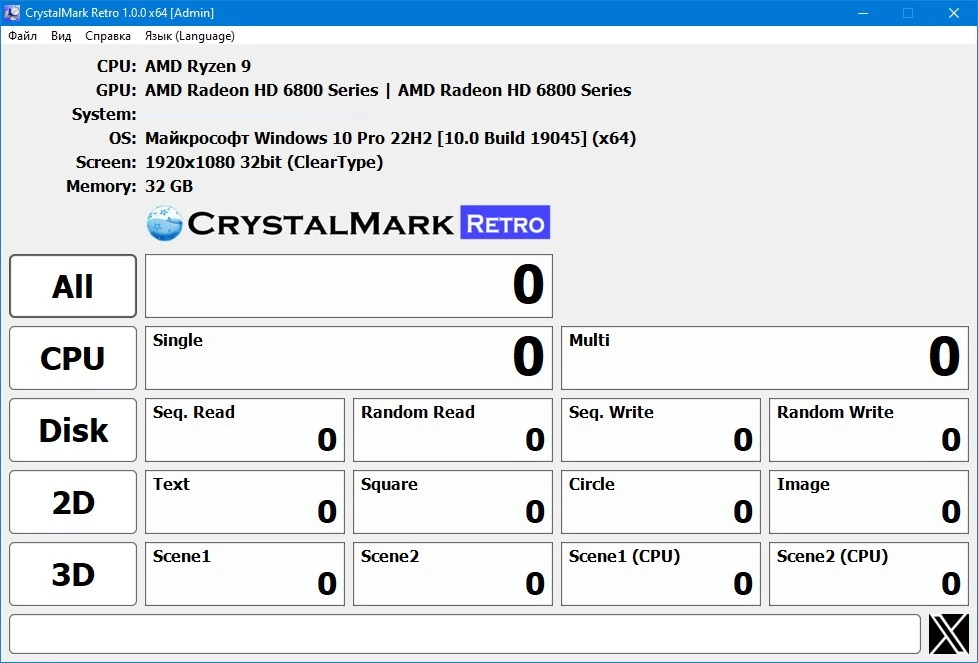
The benchmark breaks down the test into multiple stages:
- The CPU is tested using ALU and FPU operations to determine raw power.
- RAM is tested for its read, write, and cache speeds.
- Drives are tested for sequential file speed.
- The graphics chip is tested by rendering 2D images and executing test 3D scenes.
- Once the process is completed, the utility generates a full report.
Pros and Cons:
- A cool, vintage appearance reminiscent of classic Windows XP software.
- The system unit’s testing is completed quickly, with full reports on each piece of hardware. However, there is no official Russian translation.
Alternatives:
Aida64 is a powerful diagnostic tool that must be purchased and activated using a key.
Novabench is a simple alternative; the graphics card tests are less detailed.
Frequently Asked Questions:
Why is the image flickering during the test? This is a great question. Is this really normal? The app pushes the graphics card to its limits.
Can I run the test on earlier systems to see their limitations? Overall, there are no issues; the program functions properly even on older operating systems such as Windows XP.