
A tiny tool called CPU Temp monitors the processor’s temperature, load, power usage, and other parameters in real time. Windows 11 and earlier versions are compatible with it. You can get it for free from the following site, which also includes a portable and repack version. No activation is necessary.
The main feature is temperature: TJ Max shows the maximum temperature the processor can tolerate, along with the individual core temperatures. This is an excellent feature for people who overclock their hardware and want to make sure the CPU doesn’t overheat. Without having to read the figures, you may quickly determine whether something is amiss by looking at the color thanks to visual thermal indicators.
I’ll say a few words about the design: I can’t think of another utility with so many customization options and more than 40 interface themes.
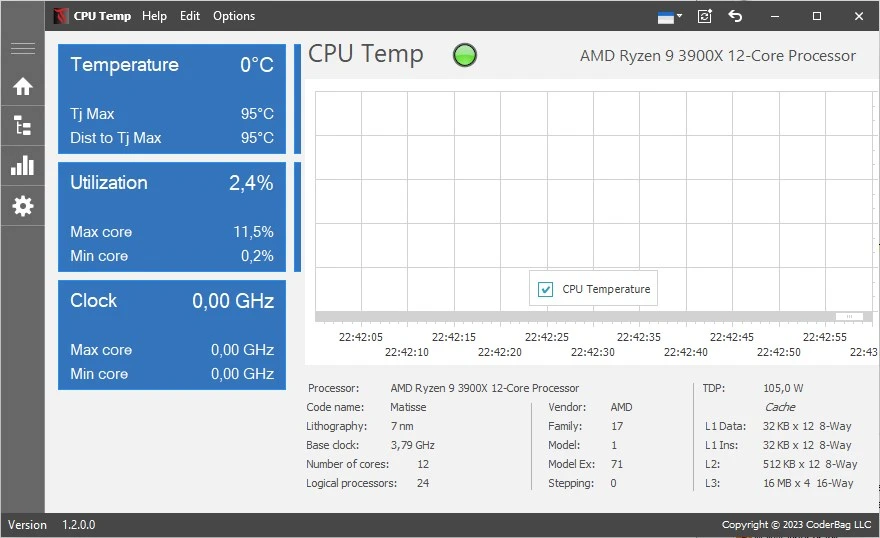
The program doesn’t overburden the system, is small, and fits in the system tray. Real-time data updates allow you to take prompt action in the event of a temperature spike, such as when the fan becomes blocked with dust or the thermal paste dries out. The CPU is operating hotter than usual, as you can notice right away.
Characteristics:
- tracking each core’s temperature using a TJ Max display
- Over forty design themes are used in the system tray, along with visible indicators of overheating, CPU load, and power usage.
Another similar tool, free and with almost the same features, is Core Temp. In addition to the CPU, HWMonitor also monitors the motherboard, storage, and GPU. It’s a fantastic choice if you require thorough monitoring.