Looking for a complete media management solution? JRiver Media Center turns any Windows PC into an entertainment powerhouse, letting you fully control your audio, video, photos, and TV. This all-in-one app connects your PC to stereos, TVs, remote controls, digital cameras, scanners, and portable MP3 players, serving as the ultimate digital hub.
JRiver Media Center can play, rip, burn, and manage all of your media, and it supports more file formats than any other player. The Media Server allows you to stream music and photos to remote PCs and access linked media from platforms such as Netflix, Hulu, YouTube, Facebook, and Twitter. It even archives high-definition TV and replaces cable TV, with a Theater View interface that can be accessed via the MC Remote, iPad, iPhone, Android, or Windows devices.
JRiver Media Center is ideal for audiophiles, movie buffs, and photo addicts alike, thanks to features such as multi-zone playback, obsessive tagging, and automated backups.
Ready to improve your media experience? Download and install JRiver Media Center now! Once you’ve experienced it, let us know how the review compares to your experience. Did we cover all of your favorite features? If you notice anything missing, please leave a comment below. Begin enjoying your media like never before!
Features of the JRiver Media Center
Audio
- Native support for DirectShow DSP filters.
- Audiophile – WASAPI-exclusive output with high-end USB DACs
- Audiophile – Added the option to play files from memory rather than disk.
- Audiophile – Support for high-end USB DACs using WASAPI
- Headphone DSP enhances the natural and comfortable listening experience.
- The soundcardSwitch command in the launcher permits soundcard selection.
- The 3D album view adjusts the text size to display additional tracks as needed.
- The 3D album view enables playing, adding, shuffling, and adding to the next-to-play list.
Images
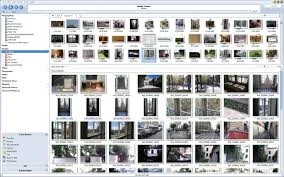
- Image Preview enables zooming from a thumbnail to rotate, remove, compare, and modify.
- Image thumbnail frames are optional.
- Photoshop supports PSD files.
- Single-command copy/send to an editor like Photoshop, then stack the new image on top of the old.
Video
- Video tagging with sidecar files.
- Chapter support for MKV and MP4.
- Chapters added to the on-screen display.
- The Info Panel displays metadata.
Television
- Metadata now includes a new “watched” field, and EPG can automatically retrieve XMLTV data.
- Automatic connection between XML channel names and MC channel names
- The Info Panel provides metadata, including TV program art.
- TV show art from YADB.
Theater View
- Watch Hulu and YouTube from the Theater View.
- Customizable nested views in Theater View.
- Customizable File Info panel for displaying metadata.
- Speed and quality improvements
- Custom backgrounds
- Touch screen support.
- On-screen clock.
Remotes and Servers
- Wiki articles: Remotes and servers.
- Remote Relay uses IR transceivers to control a set-top box or receiver
- Remote Setup Wizard.
- Media Center: Remote learning and blasting
- The Media Center can connect to another Media Center and operate as a remote (TRemote).
- New HID remote-control plug-in provides shortcuts for keyboard, mouse, and gamepad.
- Remote control using REST-based Web Service Interface in Library Server
- The Library Server supports read and write access, enabling shared, multi-user database access.
- DLNA was added to the UPnP Server.
- Library Server clients can send changes back to the server.
- Library Server connections enable playback on the server as Playing Now zones.
Portable JRiver Media Center
Portable JRiver Media Center lets you take your media hub with you wherever you go! No installation is necessary; run it from a USB or external device. It is ideal for travelers and on-the-go users, as it offers all the functionality of the desktop edition, allowing you to manage, stream, and play media at any time and from any location without leaving a trace on the host computer.