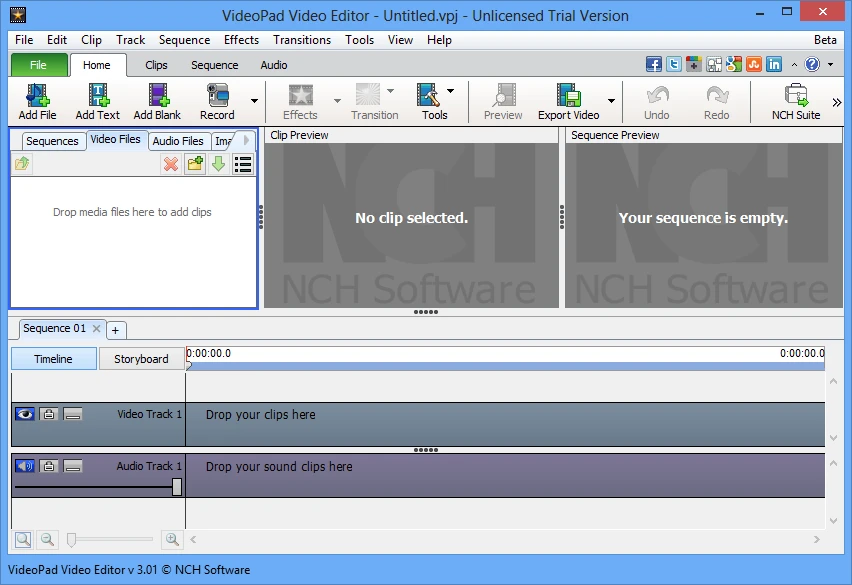
Working with video files, particularly when editing them, requires specialised software that includes all necessary capabilities. Among such beginner-level programs, VideoPad Video Editor stands out; you may get it below. The interface is divided into two areas, making it easier to work with effects, transitions, and more flexible file management, including audio track mixing.
The program enables you to record video from a camera or similar device. Once completed, you can add films to a queue and then select and modify only the ones you require. You can use subtitles, bookmarks, import or export all files, output video in 3D, choose and configure the output format, and apply sound effects.
VideoPad Video Editor also lets you apply video effects, adjust brightness and hue, and add filters and transitions. There’s a lot to say about this tool, but I’ll keep it simple: after 14 days of use, the trial term expires, and the only limitations are the supported formats. AVI, WMV, ASF, and DVD. Overall, it’s adequate for household use.
Features:
- A simple editor that supports a wide variety of video formats
- The application can also support several image formats, including BMP and GIF.
- If you need to take a picture from a DV camera, software can also help.
- It’s worth mentioning that there are ready-made transitions, but you won’t be able to change them, so we’ll go with what’s provided.
- Of course, you may work with sound, alter, delete, and add songs.
- The results can be saved in one of the formats.
- You can burn the results to a disc, from a CD to Blu-ray.