Cyberduck is a file manager that supports cloud and distant services. It’s similar to File Explorer, but instead of local drives, it shows the contents of FTP servers, Google Drive, Dropbox, Amazon S3, and other services. No longer use web clients or webpages. Each service has its own appearance and feel, which isn’t necessarily appealing or convenient; now, everything is universal and intuitive.
While you may like to hop between programs, I do not, especially when I am uploading things to multiple destinations. This program offers a consistent, simple interface for managing all of your external files.
Possibilities:
- Cyberduck’s key feature is its support for a wide range of protocols and storage formats.
- Connects via FTP and SFTP and understands what WebDAV is.
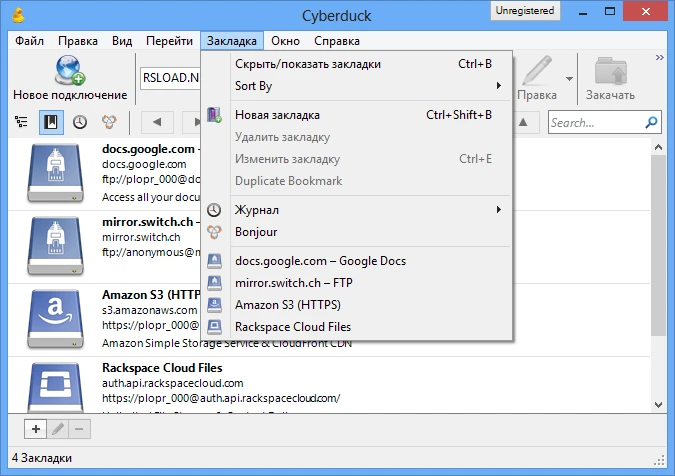
- The interface is familiar, and working with files and folders is identical to using a local PC. You can drag and drop files, make folders, and so on.
- All your connections can be saved as bookmarks for easy access, and there is a history.
- Integration with external editors is a nice feature: you may open any text file or image from the server immediately in your preferred editor. Once you save something, it is automatically posted to the server.
- There is encryption, as well as integrated support for Cryptomator, which allows you to encrypt data before uploading it to the cloud.
Apple Bonjour technology, which also runs on Windows, allows anyone to monitor and control existing servers on their home network.
Professionals will appreciate support for Amazon Cloudfront CDN, which provides access via Amazon S3. Amazon then replicates the data across servers worldwide, including Europe, North America, and Asia.
If a user requests data from their home country, it will be sent to them as close as possible. This should result in faster transfer speeds and shorter response times. The program also lets you remove data from this network.