Introducing FinePrint Full, a robust Windows printer driver that simplifies your printing experience. FinePrint allows you to easily make booklets, compose print jobs from several sources, and print double-sided on any printer. Say goodbye to wasted paper and toner – FinePrint can cut printing costs by up to 30%. It also includes capabilities such as printing on electronic letterhead and inserting gutters for easy binding. FinePrint makes it easy to manage your print jobs, saving you time and aggravation. Enjoy the assurance that what you see on screen will match the printed product exactly. Make printing issues a thing of the past by downloading FinePrint from the developer’s website today and enjoying printing made simple.
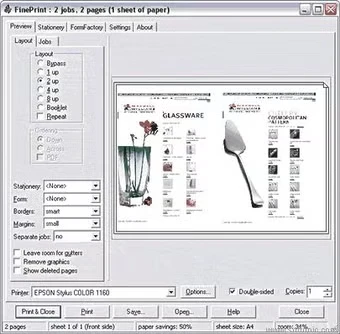
FinePrint also has a global print previewer, the ability to delete unnecessary pages, convert to grayscale, remove blank pages, text, and images, print multiple pages on a single sheet, and archive print jobs. There are numerous approaches to reducing paper consumption in a company. Duplex printing and multi-up printing are among the most common options. These strategies can be helpful, but they are not optimal.
Features of FinePrint (printer software)
Duplex printing: Printing on both sides of the paper (known as duplexing) with specific duplexing gear can help you save paper, and FinePrint fully supports it. However, there are certain drawbacks to duplexing:
- It requires specialized hardware, which is not available on many printers.
- The user must specifically request duplexing service via the printer driver, which can be a time-consuming process.
- Duplexing takes longer than printing two single sheets of paper because of the longer paper path and the complex mechanics of duplex machines.
- Printer jams are more likely in duplex printers, which may demand thicker paper stock.
Multi-up printing: Some printer drivers allow you to print multiple pages on a single sheet. Multi-up printing, as it is known, is a fantastic technique to save paper since it uses less paper and toner, speeds up the printing process, and reduces wear and tear on printers. Surprisingly, these drivers go unused because:
- The multi-up function is implemented differently by each printer brand and model, as is the user interface.
- Multi-up functions are hidden within the printer driver and are challenging to reach.
- There is no preview feature available to assess whether the text will be readable in various multi-up formats.
- When printing single pages, the user must remember to reset the multi-up setting. Frequently forgetting to do it leads to reprinting, which wastes more paper and time.
Best PDF Printer.
FinePrint supports duplex printing on all printers but recommends multi-up printing as the preferred option. FinePrint is a good solution for the following reasons:
- A single printer driver delivers advanced functions across all printers, avoiding the training burden caused by multiple user interfaces from separate manufacturer drivers.
- A print preview window appears for each print operation. This makes it simple to select the optimum layout for the specific material being printed.
- When no additional formatting is required, the Bypass button sends the document directly to the printer with a single click.
- Server edition simplifies installation across workstations.
Aside from multi-up printing, FinePrint offers several more features that improve efficiency:
- Jobs can be previewed and printed using electronic versions of the company’s letterhead and forms. This eliminates the need to acquire pre-printed forms while also enforcing company graphic standards.
- Multiple jobs can be combined into a single print job, eliminating the issue of intermingled jobs.
- Unwanted pages from emails and online pages can be eliminated before printing.