If you want a quick, lightweight, and feature-rich file manager for Windows, XYplorer is the ideal choice. XYplorer, intended for both casual and power users, combines a multi-tabbed interface, extensive search features, and portability into a single straightforward application. Whether you’re organizing files, evaluating documents, or automating tedious operations, XYplorer makes the process simple and pleasant. Let’s look at what makes this software a must-have for Windows users.
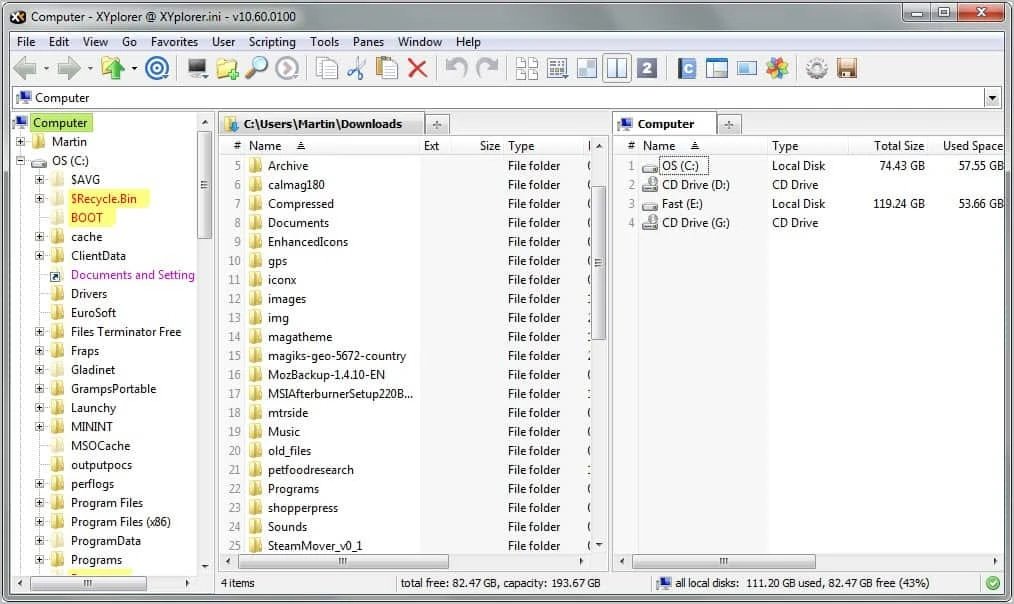
Key Features of XYplorer:
- Tabbed browsing lets you manage multiple folders at once with a complete multi-tabbed interface.
- A dual-pane interface makes file management easier, boosting productivity.
- Powerful File Search: Includes Boolean Logic, Regular Expressions, Content Search, and other features.
- Folder View Settings: Save and automatically restore view settings for any folder.
- Mini Tree: Quickly navigate directories with Mini Tree.
- Folder Sizes: You can view folder sizes directly in the file list.
- Tags and Comments: Customize individual filenames with colors, labels, and comments.
- User-Defined Commands: Create custom commands to automate repetitive operations.
- Scripting: Use scripting capabilities to complete sophisticated tasks.
- File Previews: With just one click, you can preview photos, audio, video, documents, and other files.
- Catalog: Make a customisable panel with connections to files, directories, and URLs.
- New Items Menu: Easily create new files and folders from a customizable menu.
- Portable file associations: Define file associations for XYplorer.
- Customizable Shortcuts: Add keyboard shortcuts to more than 300 functions.
- Clean Interface: A user-friendly design that is simple to browse.
Why Use XYplorer for Windows?
- Portability: It can be used anywhere without requiring any installation or system adjustments.
- Speed and Lightweight: XYplorer is extremely quick and requires minimal system resources.
- Customization: Customize the interface, shortcuts, and instructions to fit your workflow.
- XYplorer stands out for its innovative features, like the Mini Tree, Catalog, and scripting.
How to use XYplorer.
- Download and run the portable version directly from a USB drive or local storage.
- Navigate Folders: Browse your files using the file tree and the tabs.
- Search Files: Use the sophisticated search engine to locate files swiftly.
- Customize Settings: Adjust folder views, shortcuts, and commands to suit your preferences.
- Automate tasks. Create scripts or user-defined instructions to automate tedious activities.
- Preview files: The preview window allows you to view files without opening them.
XYplorer versus Windows Explorer
While Windows Explorer is the default file manager for Windows, XYplorer has various benefits:
- Unlike Windows Explorer’s single-pane architecture, the tabbed interface lets you manage multiple folders in separate tabs.
- Advanced Search: XYplorer provides Boolean logic, Regular Expressions, and content search, which Windows Explorer does not.
- Portability: XYplorer is portable and does not require installation, whereas Windows Explorer is dependent on the operating system.
- Customization: Unlike Windows Explorer, XYplorer offers extensive interface and shortcut customization.
- Unique Features: Tools such as the Mini Tree, Catalog, and scripting make XYplorer far more versatile.
Frequently asked questions (FAQs)
Is XYplorer free?
XYplorer is commercial software, though it offers a 30-day free trial to evaluate its functionality.
Can I use XYplorer on Windows 10 or 11?
Yes, XYplorer is entirely compatible with Windows 10 and 11.
Does XYplorer support file previews?
Yes, XYplorer allows you to preview photos, audio, video, documents, and other files with a single click.
Can I use XYplorer with a USB drive?
Absolutely! XYplorer is entirely portable and runs flawlessly from a USB disk.
Final Thoughts
XYplorer is more than simply a file manager; it is a productivity tool that streamlines file management and increases efficiency. With its mobility, sophisticated search, and customizable UI, XYplorer is an essential tool for anyone trying to improve their Windows workflow.
Are you ready to take control of your files? Download XYplorer now to enjoy the most excellent file management solution!