
XtraTools Pro is a versatile and powerful software suite that helps Windows users improve, manage, and repair their PCs. With a diverse set of utilities, it offers advanced tools for cleaning, optimising, and boosting your computer’s performance. This is especially handy for users who want greater control over system settings, file management, and system health without having to cope with complex manual operations.
Here’s an in-depth look at XtraTools Pro, including its primary features and benefits for keeping your Windows system clean and quick.
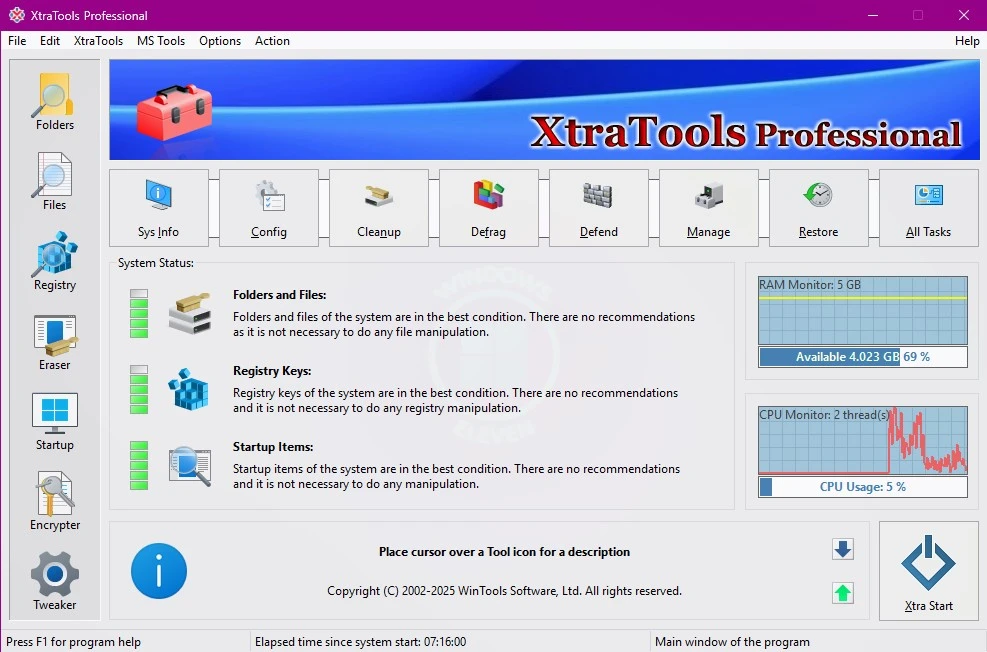
Key Features of XtraTools Pro:
System optimisation tools:
Disk Cleaner examines your system for garbage, transient, and unnecessary cache files, which can slow performance. Removing these files frees up important disk space and boosts overall performance.
Registry Cleaner: The registry is a crucial component of Windows, but it can grow cluttered with outdated or invalid entries. A registry cleaner examines and removes unnecessary registry entries safely, thereby reducing the likelihood of system crashes.
Memory Optimiser monitors and optimises RAM usage. It minimises memory usage caused by unneeded background activities, improving multitasking and system performance.
XtraTools Pro’s Startup Manager allows users to control which programs and services start when Windows boots. Turning off unneeded starting apps will significantly improve boot time and system performance.
This enhanced version of the Windows Task Manager offers deep insights into ongoing processes and resource utilisation, and allows you to terminate refractory apps.
System fixes:
System Tweaker: XtraTools Pro provides comprehensive customisation options for Windows settings. These modifications enable users to customise system behaviour, interface settings, and performance according to their preferences.
Security tips: Users can stop some Windows services or features to protect sensitive information and reduce security threats.
Tools for managing files and protecting your privacy:
Use File Shredder to securely erase files that cannot be recovered with data recovery software. It is convenient for deleting sensitive or confidential data.
Duplicate File Finder: This tool searches your hard drive for duplicate files that consume space and slow down your system. Removing duplicates frees up storage space and simplifies file management.
XtraTools Pro enables quick file encryption and decryption, providing additional security for essential data.
System Monitoring:
XtraTools Pro gives complete system information, including hardware and software settings. Users can monitor their system’s health by viewing CPU, RAM, disk space, and network usage.
The program provides system backup and restore capability, allowing you to recover from faults or failures by restoring your computer to its former operating state.
Uninstaller and Applications Manager:
XtraTools Pro’s uninstaller removes unwanted programs, including leftovers and hidden components that other uninstallers may miss.
The Software Manager feature allows you to manage installed apps. It offers insights regarding program usage. It also helps rapidly identify unnecessary applications that can be uninstalled to free up resources.
Benefits of Using XtraTools Pro
Improve system performance by cleaning disks, optimising memory usage, and managing startup settings. XtraTools Pro helps improve your computer’s performance by deleting junk files, minimising memory use, and reducing background activity.
XtraTools Pro provides advanced security and privacy features, including file shredding, encryption, and security modifications. By permanently removing critical files and making system security changes, you can reduce the risk of data breaches and unauthorised access.
XtraTools Pro’s user-friendly interface prioritises ease of use while offering powerful tools. Its straightforward interface allows both novice and advanced users to operate the software. Every tool is available from the main dashboard, and most tasks need only a few clicks.
XtraTools Pro provides comprehensive system control, going beyond basic cleaning. It offers extensive customisation options and precise information about system performance. For users seeking complete control over their Windows environment, the software provides several ways to tweak and fine-tune system behaviour.
XtraTools Pro offers a cost-effective solution for system maintenance, cleaning, and optimisation by combining all functionality into a single package. It provides a one-stop solution for keeping your computer in peak condition, making it a more cost-effective alternative to hiring a professional system support team.
XtraTools Pro is safe and non-intrusive, ensuring your system remains unharmed. It offers non-invasive methods to clean and improve your PC. It prevents crucial files and system settings from being unintentionally destroyed or modified.
XtraTools Pro for Home Users:
For users who use their PC for everyday tasks like browsing, watching videos, or playing games, XtraTools Pro keeps the system fast, safe, and free of unwanted junk.
XtraTools Pro offers superior performance and security capabilities for office and commercial environments, preventing system slowdowns and crashes.
IT Specialists and Technicians:
Advanced optimisation options, file management, and system monitoring capabilities make XtraTools Pro an invaluable tool for IT support personnel, allowing them to quickly maintain and troubleshoot Windows computers for their clients or businesses.
Conclusion
XtraTools Pro is a comprehensive, reliable system optimisation suite that includes all the tools you need to manage, clean, and optimise systems. Its diverse capabilities, ranging from disk cleanup and memory optimisation to enhanced security and file management, make it an adaptable option for improving system efficiency, preserving data, and increasing user control. Whether you’re a regular user or a technical professional, XtraTools Pro provides an accessible, powerful suite of tools to help your system perform at peak efficiency.