RPManager is a useful add-on for managing render passes in Autodesk 3ds Max. What does this mean? The plugin is designed to store as many render settings as you wish in a single scenario. No more making project copies and manually resetting settings after each pass.
You can download RPManager below; it is free with activation. I recommend checking your 3ds Max version before installing; the plugin is compatible with versions from 2013 to 2026. For optimal performance, you’ll need Windows 10 or Windows 11, at least 8 GB of RAM, and approximately 10 GB of free space.
The program’s key feature is its clean, single-window presentation that includes all relevant parameters. The camera, visibility, object characteristics, background, output settings, and other factors can all be customized for each pass. The software automatically saves and restores the desired settings before beginning the render, considerably minimizing the possibility of errors.
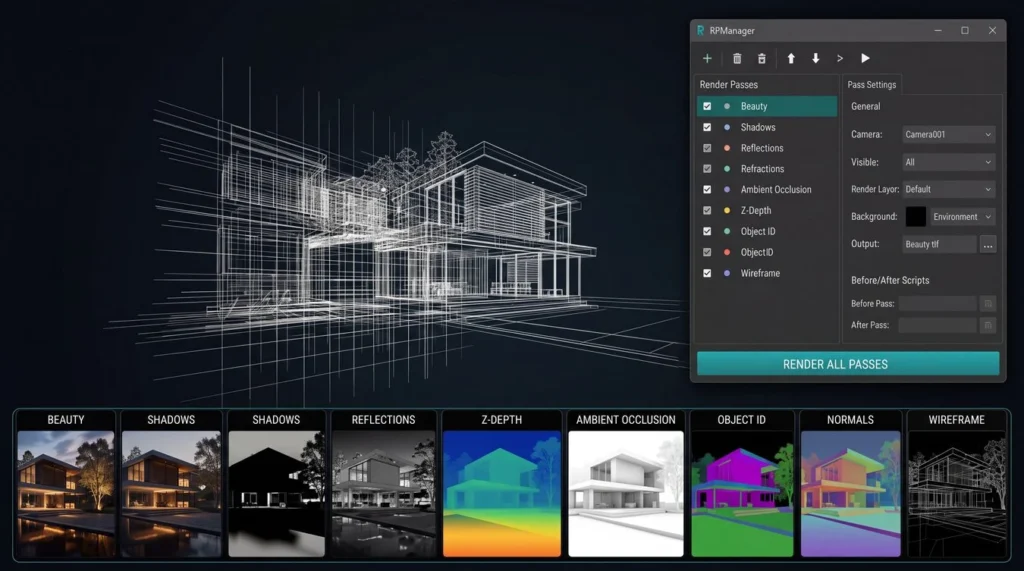
Another nice feature is that if the desired function is not present in the interface, you can enable the BeforePass and AfterPass scripts. They run before or after a pass to automate additional tasks. This plugin complements, rather than replaces, the conventional 3ds Max render window.
RPManager is an excellent solution for architectural visualization, product scenarios, and complex projects that will later be processed in Photoshop or Composer.
Pros:
- Features include unlimited render passes,
- options to configure individual passes within a project,
- and support for multiple cameras.
- Supports BeforePass and AfterPass scenarios,
- resulting in fewer scene copies and manual activities.
Answers to Questions:
Can RPManager be used with several cameras?
Yes, each camera receives its own pass with unique parameters.
Do I have to replicate the scenario for each pass?
No, the options are saved in a single project, saving both space and loading time.