
miniToggle is a quick tweaker for File Explorer and Windows settings. Configuring File Explorer requires either fiddling around with the registry, which is inconvenient, or using complex software. Complex managers are not always up to the task; in many cases, you only need to choose a few options. This small utility is ideal for these tasks; it allows you to manage basic file display and system interface settings with ease.
You can download miniToggle below; the software is free, so there is no need to activate it.
Configure File Explorer with one click:
After launch, you’ll see a small window with a list of options. Wait for the button to apply the settings. It may take a few seconds for the settings to take effect, but do not worry; this is normal. The software is making system changes and restarting processes simultaneously.
Using the settings, you can configure the utility’s behavior at operating system startup and enable rounded corners for the interface.
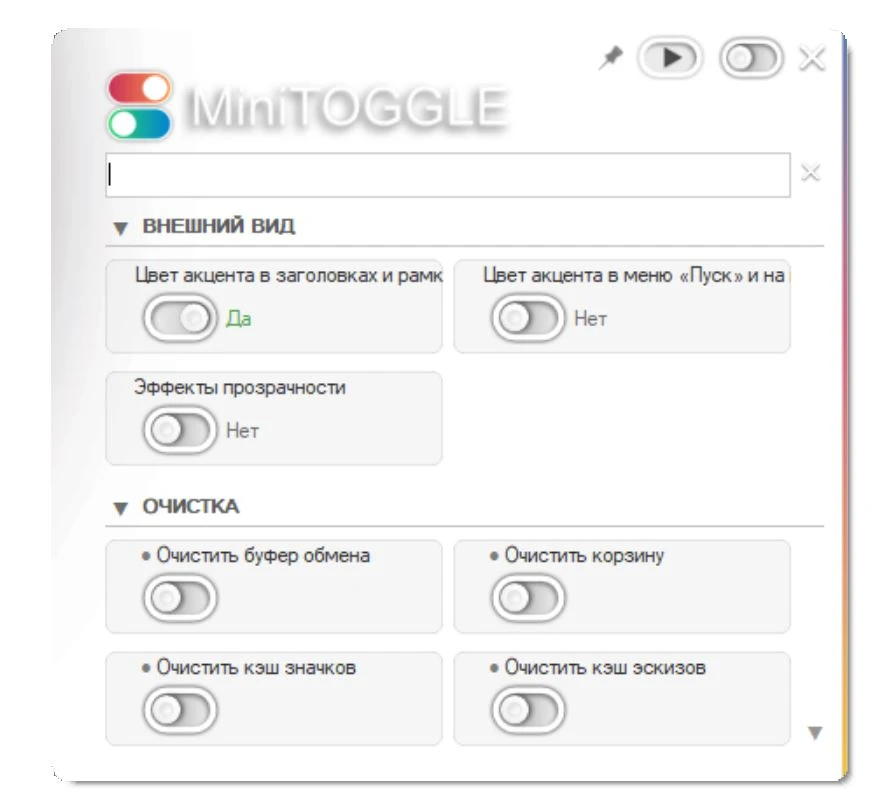
Basic settings:
- Show and hide invisible files in one click
- display extensions for all document types
- Quickly enable the classic context menu in Windows 11
- display seconds on the taskbar clock
- Switch the entire system to a dark theme
- System cleaning and privacy
- There are tweaks and more; you can clean up your system. For example, if you click the trash bin to empty it every time you log in, the software will do so automatically. It also protects your privacy by deleting traces of your computer’s activity.
What can be cleaned:
history of running programs and clipboard list of recent files in Explorer, address history in the Explorer line, cart contents without unnecessary clicks
Pros and Cons:
Pros:
Works quickly, doesn’t waste computer resources, solves the problem with the inconvenient Windows 11 menu, and has a simple Russian interface. Cons:
Sometimes freezes for a second when applying settings.
Similar programs:
Winaero Tweaker – cool software with many settings, too complicated for a beginner.
Ultimate Windows Tweaker – a good alternative, no quick switch for hidden files at hand.
Responses to frequently requested questions:
Is the program safe?
Of course, the utility changes the standard registry keys; it will not harm the system. Do I need to run it with administrator rights?
To apply some settings, it is advisable to run the program with administrator rights.