
Windows 10 and Windows 11 include built-in antivirus software, which many people prefer to turn off, but that’s not the focus today. Windows Defender is an easy-to-use program for detecting viruses and spyware. It helps Windows PC users save money by eliminating the need for third-party software. However, system security may always be enhanced. This can be done with DefenderUI, a free tool that enhances the security of your Windows 11 or 10 PC. It reveals hidden security features and more!
First and foremost, this enhancement enhances the default Defender interface. As stated on the official website, this program was designed to provide a user-friendly, efficient interface for Microsoft Defender. They’re not lying; DefenderUI provides a far more advanced interface than the built-in app. It is also intended to improve clarity and simplify the control of various Windows Security settings. You’ll see important options, including the ability to set or disable real-time protection, Windows Firewall, and cloud-based security. Furthermore, exclusions and quarantined files will be much easier to manage. But its usefulness does not end there.
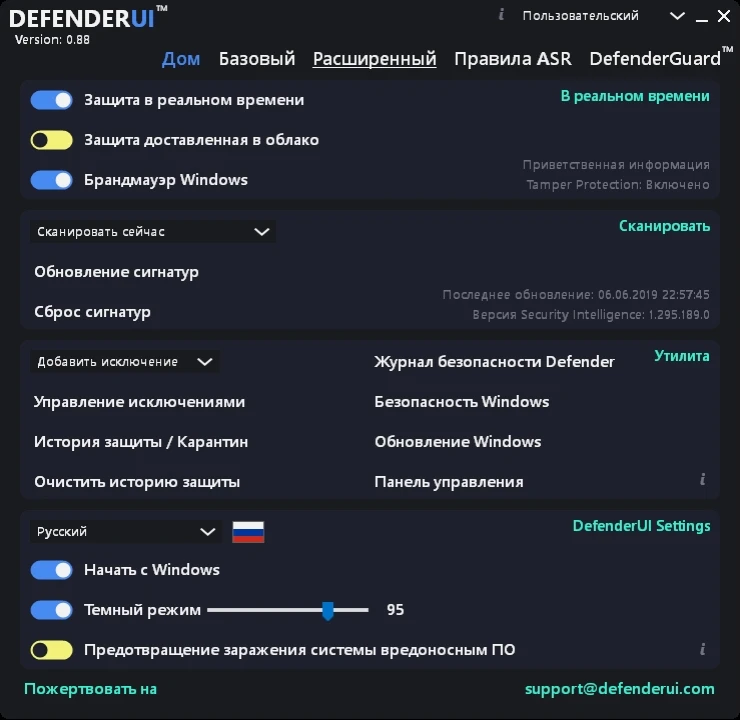
The program will help you access previously hidden Windows Security features. In some cases, they may be unavailable or inaccessible in certain settings. Sometimes you have to use the Local Group Policy Editor or Registry Editor to enable them. Thanks to DefenderUI, you can access all settings with a single click, in Russian, which is pre-selected at launch and can be modified later. Navigate the sections and enable the settings you consider essential.
After launching DefenderUI, you can access Windows security options such as ransomware protection, portable disk scanning, and dangerous script blocking. These functionalities are usually unavailable owing to active access protection. With this software, all of these options are immediately visible. It’s also worth noting that at launch, you can choose from four initial security profiles: suggested, interactive, aggressive, and default. The profile you choose will depend on the level of security you require.