Want to get the most out of your Windows 10/11 system? Yamicsoft Windows Manager is ready to help! This all-in-one program has over 40 features to optimize, modify, clean, speed up, and fix your Windows setup, resulting in a faster, smoother, and more secure experience.
Yamicsoft Windows Manager Full Version helps you increase performance, resolve issues, and improve stability and security. Additionally, its customization tools allow you to tailor your Windows experience to your preferences and requirements. Whether you’re a computer novice or a seasoned veteran, this tool will help you improve your Windows experience.
Are you ready to revolutionize your system? Download and install Yamicsoft Windows Manager right now! Once you’ve experienced it, let us know how the review compares to your experience. Did we cover all of your favorite features? If you notice anything missing, please leave a comment below. Begin enhancing your Windows experience today!
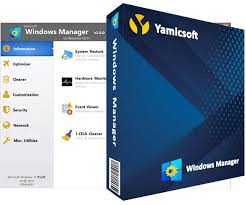
Features of Yamicsoft Windows Manager v2.3.3 :
Information
Creates a system restore point manually; Gets detailed information about your system and hardware, and helps you find the Microsoft product key for Microsoft Windows and Microsoft Office; Displays and handles all running processes and threads. Repair Center assists in diagnosing and resolving various system issues. Cleans up your system with only one click. The Optimization Wizard is handy for users who are unfamiliar with computers.
Optimizer
Tweaks your system to boost performance. Manages and customizes the Windows boot menu to your liking. Startup Manager manages all startup programs in Windows Start, examines and repairs advanced startup items to restore the damage caused by viruses. Manages and optimizes system services and drivers to enhance performance. Manages and optimizes scheduled tasks to accelerate your system.
Cleaner
Disk Analyzer can evaluate and display the disk space utilization of all programs, files, and folders to identify which are consuming your disk space, and it displays the results in a chart. It also securely cleans up the WinSxS folder and reduces the size of the component store. Smart Uninstaller can completely remove apps from your system, leaving no residual files or registry entries. Desktop Cleaner analyzes and moves unnecessary shortcuts, files, and folders on the desktop to predefined directories. Searches and deletes trash files to conserve disk space and boost speed; Searches and deletes duplicated files to conserve disk space. Registry Cleaner scans the Registry to locate and delete invalid items. Registry Defrag rebuilds and re-indexes your Registry, reducing Registry access time and improving application responsiveness, while also removing Registry errors and corruption.
Customization
Customizes system parameters to your tastes by adjusting File Explorer, Desktop, Start, Taskbar, and Notification area; Adds files, folders, and system items to this PC and its desktop. Pin files or folders to your desktop, taskbar, or start menu. Creates rapid startup items for the jumplist in the toolbar. Controls the context menu when you right-click a file, folder, etc. Edits the shortcut menu that appears when you right-click the Start button (Win+X shortcut); Customizes the appearance of your system. Edits and adds shortcuts that are run on the Run dialog box. Adjusts the Windows Apps and Microsoft Modern UI settings.
Security
To strengthen system security, it tweaks system, component, UAC, and Sign-in settings, alters other settings, and restricts access to drives and programs. Secure your important data and folders by encrypting files and moving system folders to safe areas; Privacy Protector preserves privacy and secures sensitive information by deleting trails; File Undelete recovers and restores lost or formatted files from logical drives. Locks various system features to increase security.
Network
Optimizes and adjusts your internet connection and network settings. Manages your URLs and IP addresses. The IP Switcher allows switching between various network setups. Edits the hosts file to speed up system internet browsing; Wi-Fi Manager can examine and manage your entire wireless network. Network tools include commonly used network utilities; Network Monitor can display traffic data transmitted by the network.
Miscellaneous utilities
Creates scheduled tasks or monitorings that trigger tasks. Shows and runs the helpful collection of utilities included with your Windows. Splits a file into smaller files or merges it back into the original file. Super Copy is a strong tool for automatically copying and backing up files. Use the Registry Tools to manage your Registry.