Are you concerned about your online and offline privacy? Wipe Pro is a free, simple, and effective security tool for protecting your personal information. It enables you to clear browser history and cache, clean index.dat files, securely remove cookies, delete autocomplete history and temporary internet files, and remove other traces left behind after using your computer. Importantly, Wipe Pro targets only evidence of your activity captured by your computer without your explicit authorisation; your personal documents are unaffected!
Wipe Pro effectively removes traces of your online and offline activity from the Windows operating system, popular web browsers such as Google Chrome, Internet Explorer, Mozilla Firefox, and Opera, and a variety of other regularly used software applications. Wipe Pro uses robust data wiping methods, such as US DoD 5220.22-M, Gutmann (full 39 stages), and Russian GOST, to totally remove your personal and private data, rendering lost usage tracks unrecoverable.
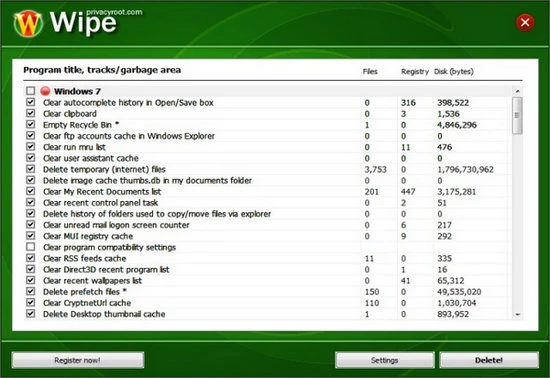
When you activate the app, you’ll get a clear list of programs that may store personal information you want to keep secret. You may quickly analyse each item to see how many files are saved and how much disk space they take up, such as cookies and index.dat files. You can choose to exclude specific programs from the wiping procedure or securely erase all selected data. The cleaning process begins when you click the “Delete!” button. A user-friendly interface appears, displaying the program being cleaned, the individual file being removed, a progress tally, and an expected remaining runtime. Wipe Pro offers a built-in Screen Lock option to enhance privacy. Try Wipe Pro for free and discover the numerous secret folders in which Windows logs your activities!
Features of Wipe Pro 2026
- A comprehensive solution for removing user tracks: Wipe deletes user browsing history, cookies, index.dat files, cache, logs, temporary internet files, autocomplete search history, recent document list, recent keywords list in toolbars, cached thumbnails of viewed images, registry cache, and more.
- Clear tracks gathered by Windows – Remove any history records, tracks, or evidence of computer usage created in Windows. Nobody will be able to see what you did on your computer.
- Clear traces across hundreds of other applications: Wipe Pro will also remove traces, evidence, and rubbish files from many programs installed on your computer.
- Impressive list with track preview – after running Wipe, you will see a convenient list of all the tracks on your PC, as well as the number of files and registry data.
- Tracks preview – you can select any item in the list to see whatever tracks (information) are stored beneath it and decide whether to clear it.
- Separated into sections, each software (including Windows) offers various cleaning options. Users can decide what to clean more thoroughly. Every region has a checkbox.
- Closing running apps: Windows does not allow deleting data that is currently in use by a running program. Wipe will look for running programs and close any that are required for a successful cleanup.
- Watching for success: Wipe will verify track removal and inform you if any files or registry records were not properly erased. This can occur when a running program locks files or registry records.
- No restore: Wipe employs anti-recovery techniques, including renaming file names to digits so that no one can guess the content of erased files.
- The wipe tray agent can remind you to clean your PC after you’ve finished browsing the Internet.
- Free updates – you should update Wipe to ensure that all of the new software you’ve installed is compatible with it.
Portable Wipe Pro
Portable Wipe Pro protects your privacy on the go. Run it from a USB stick to clean browser history, wipe cookies, and securely erase PC tracks at any time and from any location.