So, this is the Vivaldi browser. It’s based on the Chromium engine but has features and functionality similar to the previous version of the popular Opera browser. It downloads and launches quickly, and the developers promise it will function well on older machines with less powerful hardware.
It was a pleasure to launch Vivaldi, which immediately reminded me of Opera’s user-friendly layout. There are recognizable features, such as a website preview, an option triggered when you hover over the chosen tab, Speed Dial (an express panel), the well-known download manager, and a useful panel with short notes on the left.
Vivaldi, available in Russian with add-ons, is ready to delight you with simple browser navigation, support for the latest technologies, including secure surfing, and efficient memory use.
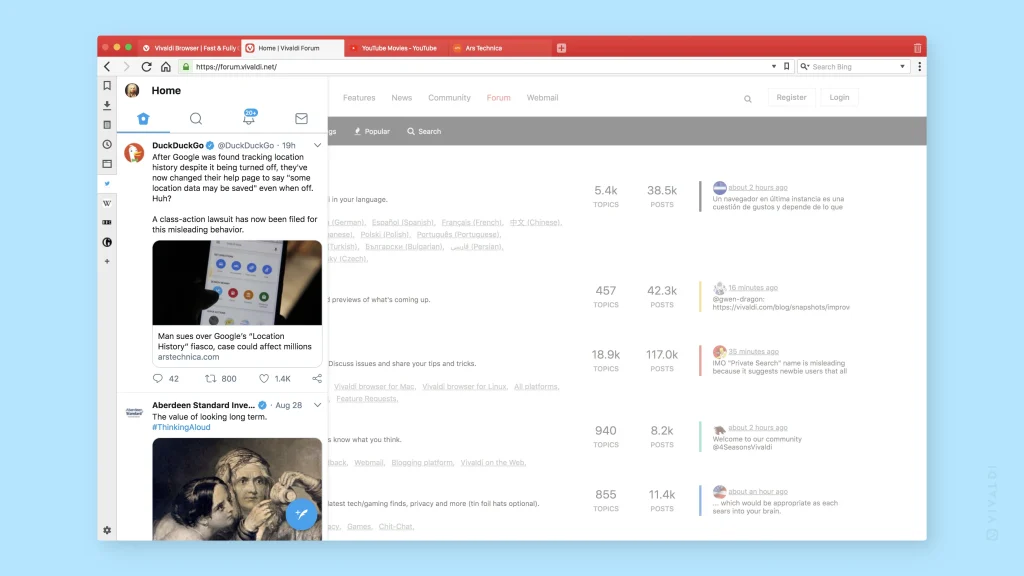
Please keep in mind that the browser was in beta for quite some time, and not all of the features were implemented. It now has a solid set of features and is ready to impress users with its high speed, privacy, and private functions. Additionally, there is an email client, synchronization, and the option to add extensions. The Vivaldi development team is similarly ambitious, wanting to improve the browser and make it the fastest and most efficient. I can only wish them luck; I genuinely enjoy the application and plan to test it for as long as feasible. Returning to the topic of the quickest browser, it’s worth noting that Maxthon has developed MxNitro, another fast-growing software. I’ll have to keep an eye on them, because competition is always an excellent occasion to try something new.
As I previously stated, you can use notes, which are helpful once you get used to them, and you can also attach your own screenshots to them. There is also a “Quick Commands” function that lets you perform practically any browser operation with hotkeys. I’ve already written about the popular Express Panel. Don’t forget that you can create separate access groups. Vivaldi can group tabs, which is quite helpful if you have a large number of them open, as I do.
Overall, I don’t have much else to say for now. I’m delighted the browser looks like the old Opera, as that’s where I began my online journey. Furthermore, it works quickly. Of course, not everything has been fully integrated yet, but that will happen over time. I hope Vivaldi has a promising future.
Best wishes to everyone, and thank you for your attention!