Stellar Data Recovery Professional Recover Your Lost Data

Imagine losing essential files, cherished images, or critical business documents—every computer user’s worst nightmare. But do not worry! Stellar Data Recovery Professional is here to save the day. Whether you’re a student working on a project, a professional handling essential data, or a casual user looking to retrieve valuable memories, this software has you covered.
Stellar Data Recovery Professional, designed for Windows users, is a powerful and user-friendly program for recovering lost or deleted data from hard disks and external storage devices. Its powerful scanning engine searches deep into your storage medium for missing files, previews them during the scan, then recovers them to a location of your choosing. You can even tailor your recovery to specific file types, such as documents, emails, multimedia, or entire folders.
One of its noteworthy features is the ability to save scan progress, allowing you to pause and resume recovery without starting over. It also includes a one-of-a-kind feature that lets you create an image of your hard drive or partition, which is extremely useful if your drive is failing or has damaged sectors.
Don’t wait to try this lifesaver! Install Stellar Data Recovery Professional from the official developer’s website today, then test its features to discover how it works for you. After that, share your comments and let us know if our evaluation missed any features—your feedback is essential!
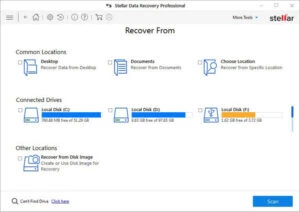
Features of Stellar Data Recovery Professional.
- Categorisation of Scan Results
- Previewing files before recovery
- Raw recovery of volumes and hard disks to find data using signatures
- recovers data from mistakenly erased volumes.
- Recovers data from formatted disks.
- Recovers deleted files and directories.
- Recovers from hard disks, portable media, including pen drives, memory cards, and more.
- Use the resume recovery option to restore data later.
- Supports 300 or more file types.
- Support for all varieties of CD/DVD with CDFS, UDF, and HFS+ file systems.
- The scanned Tree can be viewed in a tabbed view with options for File Type, Tree View, and Deleted List. Users can also add and update file kinds, making it more robust.
- Users can build images of their hard disks and volumes for recovery.