Reg Organizer is a comprehensive and feature-rich utility for editing, cleaning, and maintaining your Windows registry. It allows you to resolve system issues and, as a result, improve your computer’s overall performance. The sophisticated deep registry search tool enables you to swiftly identify all registry keys linked to a particular application. The tool also allows you to examine, modify, and browse registry files (.reg) directly from Windows Explorer.
Included is a powerful Registry cleaner that safely compacts, restores, and optimizes your system registry. Reg Organizer lets you thoroughly scan the registry for all keys associated with a specific application, and it does so faster and more precisely than many similar apps. Additional capabilities include discovering and replacing registry items, running automatic registry cleanup, using the built-in Disk Cleanup program, and accessing a variety of undocumented Windows functions.
Reg Organizer’s plug-in expandability allows for endless third-party additions. It also includes an integrated program remover that lets you completely remove any unwanted applications from your PC.
Reg Organizer allows you to modify the ‘Open with…’ context menu, manage entries in the ‘Add/Remove applications’ dialog, configure starting applications, analyze shared DLLs, and more. This wide range of functions is handy for both system administrators and daily users.
Are you ready to take control of your Windows registry and optimize your system? Download Reg Organizer now! Learn sophisticated registry management and system maintenance.
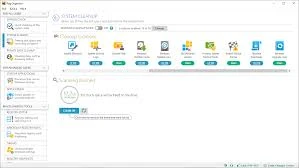
Features of Reg Organizer Full
- The registry editor allows you to examine and modify the system registry, manipulate registry keys and values, export, import, and copy them, and so on.
- The registry cleaner in Reg Organizer can detect a wide range of registry issues. These include examining the registry for invalid references to files, folders, and DLLs; invalid uninstallation data; obsolete and invalid file extensions; and other issues. Reg Organizer can resolve many of these registry issues.
- The registry search capability can discover all keys associated with a specific program and delete them if necessary. This capability is functional if you want to manually delete an application that doesn’t have an uninstall feature. In this instance, the keys can remain in the registry, which can interfere with the proper operation of other programs. Reg Organizer performs the most thorough searches and often locates keys that other similar applications miss.
- Defragmentation and compression of the registry improve its performance and, by extension, your system’s overall performance.
- The ability to modify numerous undocumented Windows settings (tweaks). It can, for example, speed up your system’s performance by sending a command to increase the cache size or by removing unnecessary libraries.
- The ability to obtain information about any selected registry key and track changes to the relevant keys.
- register files (*.reg) can be previewed before their contents are added to the system register. The files can be seen in Windows Explorer. Reg Organizer displays the file contents in a tree-like structure, making it easier to see all of the keys that will be imported into the registry.
- A functional registry file editor that allows you to change keys and values, as well as add and delete data from it—reg files.
- Allow rapid access to all programs that automatically launch when you power on or log in to your computer. Reg Organizer lets you analyze, edit, and turn off such programs.
- Registry search-and-replace mode provides a variety of options for searching the registry and replacing records that meet the specified criteria.
- Built-in software uninstaller. It can take snapshots before and after app installations and undo ALL system modifications made by an app, as if it had never been installed. In addition, this feature can be used to display the changes the application makes to each system component.
- The Disk Cleanup utility allows you to automatically remove unwanted files from your computer’s hard disk and search for and fix faulty shortcuts.
Benefits of Reg Organizer Portable Edition:
The portable version of Reg Organizer is ideal for those who wish to use the software without installing it on their computer. You may carry the portable file on a USB flash drive and execute it on any Windows PC immediately. It does not affect your Windows registry or leave any leftover files, so your system remains clean and optimized.